How can I parse / create a date time stamp formatted with fractional seconds UTC timezone (ISO 8601, RFC 3339) in Swift?
Solution 1
Swift 4 • iOS 11.2.1 or later
extension ISO8601DateFormatter {
    convenience init(_ formatOptions: Options) {
        self.init()
        self.formatOptions = formatOptions
    }
}
extension Formatter {
    static let iso8601withFractionalSeconds = ISO8601DateFormatter([.withInternetDateTime, .withFractionalSeconds])
}
extension Date {
    var iso8601withFractionalSeconds: String { return Formatter.iso8601withFractionalSeconds.string(from: self) }
}
extension String {
    var iso8601withFractionalSeconds: Date? { return Formatter.iso8601withFractionalSeconds.date(from: self) }
}
Usage:
Date().description(with: .current)  //  Tuesday, February 5, 2019 at 10:35:01 PM Brasilia Summer Time"
let dateString = Date().iso8601withFractionalSeconds   //  "2019-02-06T00:35:01.746Z"
if let date = dateString.iso8601withFractionalSeconds {
    date.description(with: .current) // "Tuesday, February 5, 2019 at 10:35:01 PM Brasilia Summer Time"
    print(date.iso8601withFractionalSeconds)           //  "2019-02-06T00:35:01.746Z\n"
}
iOS 9 • Swift 3 or later
extension Formatter {
    static let iso8601withFractionalSeconds: DateFormatter = {
        let formatter = DateFormatter()
        formatter.calendar = Calendar(identifier: .iso8601)
        formatter.locale = Locale(identifier: "en_US_POSIX")
        formatter.timeZone = TimeZone(secondsFromGMT: 0)
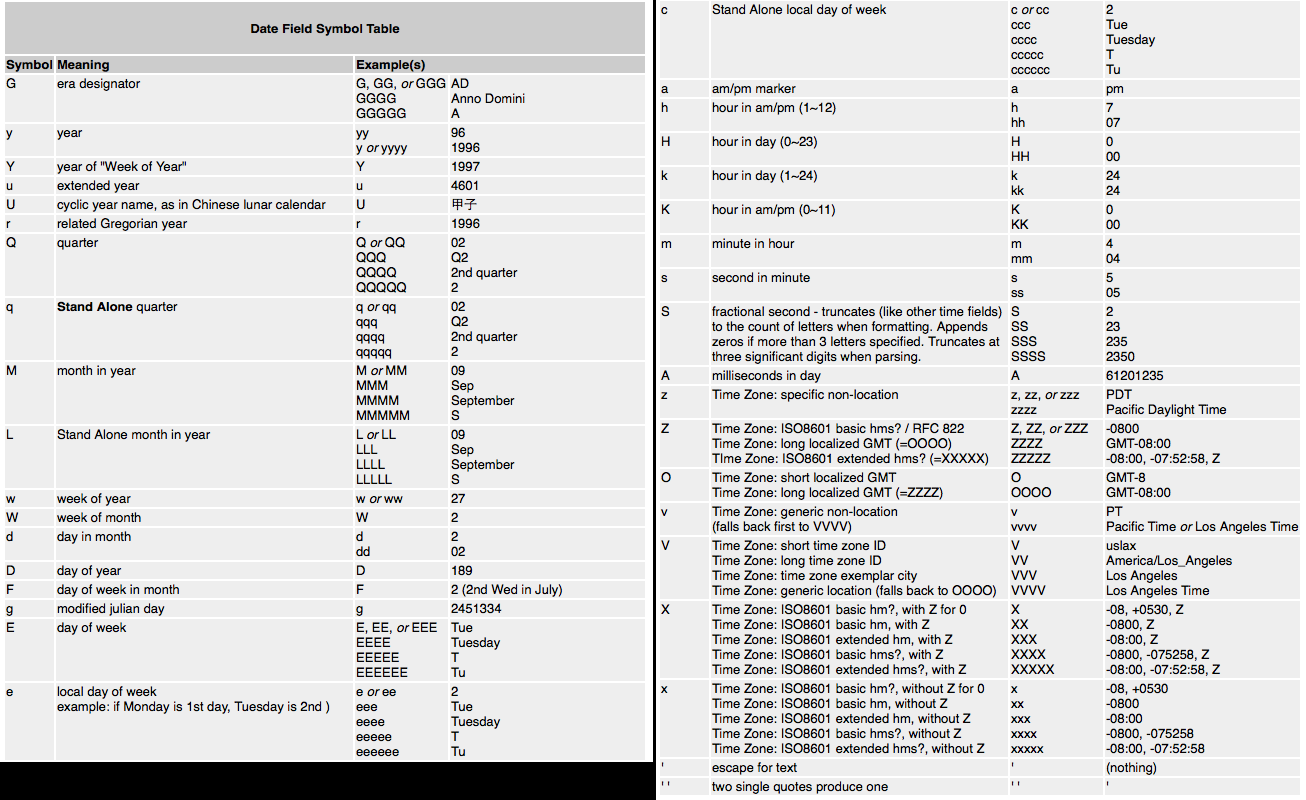
        formatter.dateFormat = "yyyy-MM-dd'T'HH:mm:ss.SSSXXXXX"
        return formatter
    }()
}
Codable Protocol
If you need to encode and decode this format when working with Codable protocol you can create your own custom date encoding/decoding strategies:
extension JSONDecoder.DateDecodingStrategy {
    static let iso8601withFractionalSeconds = custom {
        let container = try $0.singleValueContainer()
        let string = try container.decode(String.self)
        guard let date = Formatter.iso8601withFractionalSeconds.date(from: string) else {
            throw DecodingError.dataCorruptedError(in: container,
                  debugDescription: "Invalid date: " + string)
        }
        return date
    }
}
and the encoding strategy
extension JSONEncoder.DateEncodingStrategy {
    static let iso8601withFractionalSeconds = custom {
        var container = $1.singleValueContainer()
        try container.encode(Formatter.iso8601withFractionalSeconds.string(from: $0))
    }
}
Playground Testing
let dates = [Date()] // ["Feb 8, 2019 at 9:48 PM"]
encoding
let encoder = JSONEncoder()
encoder.dateEncodingStrategy = .iso8601withFractionalSeconds
let data = try! encoder.encode(dates)
print(String(data: data, encoding: .utf8)!)
decoding
let decoder = JSONDecoder()
decoder.dateDecodingStrategy = .iso8601withFractionalSeconds
let decodedDates = try! decoder.decode([Date].self, from: data)  // ["Feb 8, 2019 at 9:48 PM"]
Solution 2
Remember to set the locale to en_US_POSIX as described in Technical Q&A1480. In Swift 3:
let date = Date()
let formatter = DateFormatter()
formatter.locale = Locale(identifier: "en_US_POSIX")
formatter.timeZone = TimeZone(secondsFromGMT: 0)
formatter.dateFormat = "yyyy-MM-dd'T'HH:mm:ss.SSSZZZZZ"
print(formatter.string(from: date))
The issue is that if you're on a device which is using a non-Gregorian calendar, the year will not conform to RFC3339/ISO8601 unless you specify the locale as well as the timeZone and dateFormat string.
Or you can use ISO8601DateFormatter to get you out of the weeds of setting locale and timeZone yourself:
let date = Date()
let formatter = ISO8601DateFormatter()
formatter.formatOptions.insert(.withFractionalSeconds)  // this is only available effective iOS 11 and macOS 10.13
print(formatter.string(from: date))
For Swift 2 rendition, see previous revision of this answer.
Solution 3
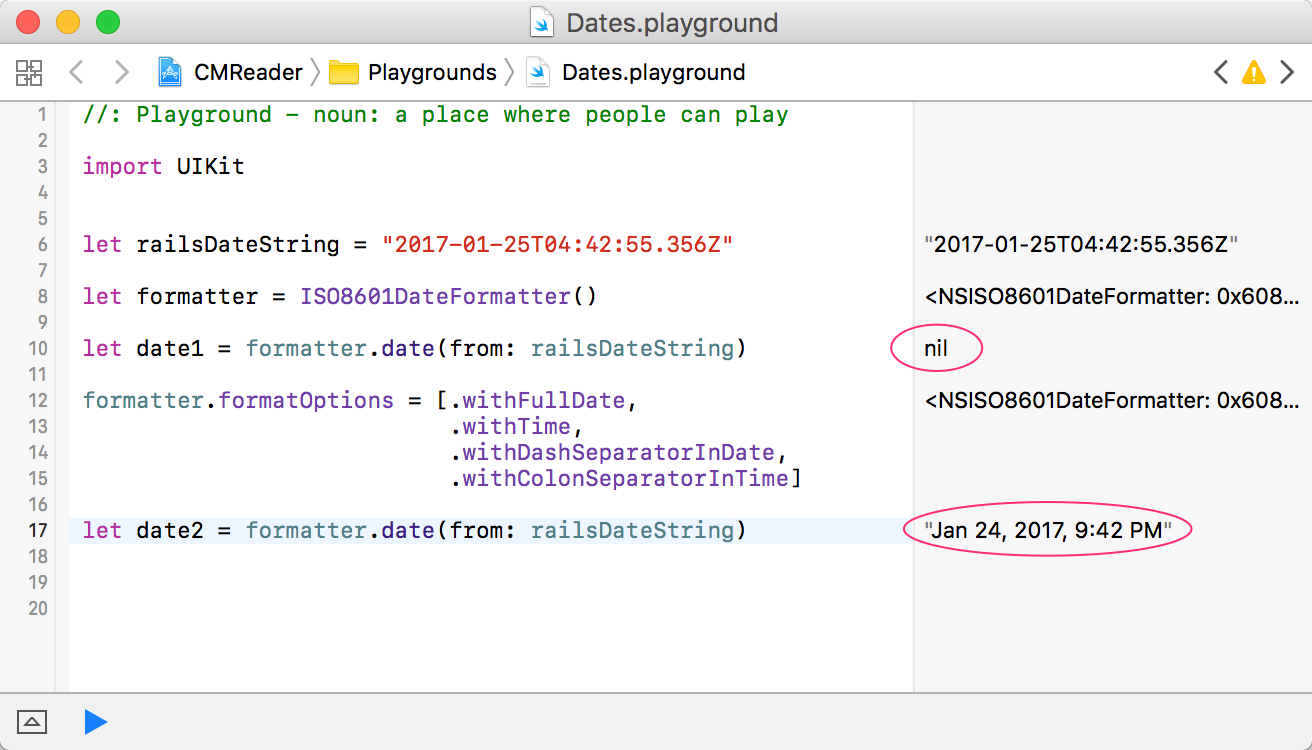
If you want to use the ISO8601DateFormatter() with a date from a Rails 4+ JSON feed (and don't need millis of course), you need to set a few options on the formatter for it to work right otherwise the the date(from: string) function will return nil. Here's what I'm using:
extension Date {
    init(dateString:String) {
        self = Date.iso8601Formatter.date(from: dateString)!
    }
    static let iso8601Formatter: ISO8601DateFormatter = {
        let formatter = ISO8601DateFormatter()
        formatter.formatOptions = [.withFullDate,
                                          .withTime,
                                          .withDashSeparatorInDate,
                                          .withColonSeparatorInTime]
        return formatter
    }()
}
Here's the result of using the options versus not in a playground screenshot:
Solution 4
Swift 5
If you're targeting iOS 11.0+ / macOS 10.13+, you simply use ISO8601DateFormatter with the withInternetDateTime and withFractionalSeconds options, like so:
let date = Date()
let iso8601DateFormatter = ISO8601DateFormatter()
iso8601DateFormatter.formatOptions = [.withInternetDateTime, .withFractionalSeconds]
let string = iso8601DateFormatter.string(from: date)
// string looks like "2020-03-04T21:39:02.112Z"
Solution 5
Uses ISO8601DateFormatter on iOS10 or newer.
Uses DateFormatter on iOS9 or older.
Swift 4
protocol DateFormatterProtocol {
    func string(from date: Date) -> String
    func date(from string: String) -> Date?
}
extension DateFormatter: DateFormatterProtocol {}
@available(iOS 10.0, *)
extension ISO8601DateFormatter: DateFormatterProtocol {}
struct DateFormatterShared {
    static let iso8601: DateFormatterProtocol = {
        if #available(iOS 10, *) {
            return ISO8601DateFormatter()
        } else {
            // iOS 9
            let formatter = DateFormatter()
            formatter.calendar = Calendar(identifier: .iso8601)
            formatter.locale = Locale(identifier: "en_US_POSIX")
            formatter.timeZone = TimeZone(secondsFromGMT: 0)
            formatter.dateFormat = "yyyy-MM-dd'T'HH:mm:ss.SSSXXXXX"
            return formatter
        }
    }()
}
Related videos on Youtube
 09 : 45
 10 : 13
 09 : 54

joelparkerhenderson
Joel Parker Henderson: software consultant for Agile, Ruby, SQL, NoSQL, iOS, Android, and LAMP stack. JoelParkerHenderson.com SixArm.com Software Solutions GitHub/joelparkerhenderson Facebook/joelparkerhenderson NumCommand.com
Updated on July 29, 2022Comments
-
joelparkerhenderson 4 months
How to generate a date time stamp, using the format standards for ISO 8601 and RFC 3339?
The goal is a string that looks like this:
"2015-01-01T00:00:00.000Z"Format:
- year, month, day, as "XXXX-XX-XX"
- the letter "T" as a separator
- hour, minute, seconds, milliseconds, as "XX:XX:XX.XXX".
- the letter "Z" as a zone designator for zero offset, a.k.a. UTC, GMT, Zulu time.
Best case:
- Swift source code that is simple, short, and straightforward.
- No need to use any additional framework, subproject, cocoapod, C code, etc.
I've searched StackOverflow, Google, Apple, etc. and haven't found a Swift answer to this.
The classes that seem most promising are
NSDate,NSDateFormatter,NSTimeZone.Related Q&A: How do I get an ISO 8601 date on iOS?
Here's the best I've come up with so far:
var now = NSDate() var formatter = NSDateFormatter() formatter.dateFormat = "yyyy-MM-dd'T'HH:mm:ss.SSS'Z'" formatter.timeZone = NSTimeZone(forSecondsFromGMT: 0) println(formatter.stringFromDate(now))-
 Fattie over 5 yearsNote that iOS10+ SIMPLY INCLUDES ISO 8601 BUILT-IN .. it will just autocomplete for you.
 -
 smat88dd over 5 years@Fattie And - how can it handle that last .234Z milliseconds Zulu/UTC part of the timestamp? Answer: Matt Longs @ stackoverflow.com/a/42101630/3078330
 -
Fattie over 5 years@smat88dd -- fantastic tip, thanks. I had no clue there were "options on a formatter", weird and wild!
-
Takagi about 4 yearsI'm looking for a solution that works on linux.
-
 Leo Dabus about 4 years@neoneye Just use the old version (plain DateFormatter) and change the calendar iso8601 to gregorian stackoverflow.com/a/28016692/2303865
-
 Nat over 6 yearsIt'd be useful to add opposite conversion extension:
extension String { var dateFormattedISO8601: NSDate? {return NSDate.Date.formatterISO8601.dateFromString(self)} } -
pixelrevision over 6 yearsJust an note that this looses a bit of precision so it's important to make sure equality of dates is compared via the generated string and not timeInterval.
let now = NSDate() let stringFromDate = now.iso8601 let dateFromString = stringFromDate.dateFromISO8601! XCTAssertEqual(now.timeIntervalSince1970, dateFromString.timeIntervalSince1970) -
manRo about 6 yearsIn RFC3339 we can find a note "NOTE: ISO 8601 defines date and time separated by "T". Applications using this syntax may choose, for the sake of readability, to specify a full-date and full-time separated by (say) a space character." Does it cover as well date format without
Teg:2016-09-21 21:05:10+00:00? -
Fattie over 5 years@LeoDabus - thanks again. Look man, here's a puzzler for you: stackoverflow.com/questions/43808693/…
-
Leon over 5 years@LeoDabus Could you explain the reason why you extend Formatter instead of DateFormatter please?
-
Leo Dabus over 5 yearsDoesn't make any difference. You can extend DateFormatter instead if you would like to.
-
thislooksfun over 5 yearsTHIS DOES NOT WORK ON LINUX. If you are targeting Linux as well, you need to remove the
Calendar(identifier: .iso8601)line, or it will segfault and crash. -
thislooksfun over 5 years@LeoDabus yes, but this is the first result for "Swift iso8601". My comment was meant to warn other developers who come across this in the future and was not directed at OP.
-
Michael A. McCloskey about 5 yearsThis is the best answer in my opinion in that it allows one to get to a microsecond level of precision where all the other solutions truncate at milliseconds.
-
Leo Dabus about 5 yearsYou would need to include in the options also the
.withFractionalSecondsbut I already tried that and it keeps throwing an errorlibc++abi.dylib: terminating with uncaught exception of type NSException. -
Matt Long about 5 years@MEnnabah It works fine for me in Swift 4. Are you getting an error?
-
freeman almost 5 years@LeoDabus, got the same error as yours, did you solve it?
-
Leo Dabus almost 5 yearscustom JSONDecoder DateDecodingStrategy stackoverflow.com/a/46458771/2303865
-
Leo Dabus almost 5 yearsIf you would like to preserve the Date with all its fractional seconds you should use just a double (time interval since reference date) when saving/receiving your date to the server.
-
Leo Dabus almost 5 years@freeman If you would like to preserve the Date with all its fractional seconds I suggest to use a double (time interval since reference date) when saving/receiving your date to the server. And use the default date decoding strategy
.deferredToDatewhen using Codable protocol -
Leo Dabus almost 5 years@pixelrevision if you need to make sure the date saved into the server and the date returned are equal you need to save the date as a Double ( timeIntervalSinceReferenceDate). Check this stackoverflow.com/a/47502712/2303865
-
axunic almost 5 yearswhy we should set the locale to en_US_POSIX ? even if we are not in US ?
-
 Rob almost 5 yearsWell, you need some consistent locale and the convention of the ISO 8601/RFC 3999 standards is that format offered by
en_US_POSIX. It's the lingua franca for exchanging dates on the web. And you can't have it misinterpreting dates if one calendar was used on device when saving a date string and another when the string is read back in later. Also, you need a format that is guaranteed to never change (which is why you useen_US_POSIXand noten_US). See Technical Q&A 1480 or those RFC/ISO standards for more information. -
freeman almost 5 years@LeoDabus, thanks for your replies, finally I took the way to let the api return date time string without fractional section, and the reason for why not use double value is for the human readable of API request/response, I learned it from this post: apiux.com/2013/03/20/5-laws-api-dates-and-times And the fractional seconds is not so important for the APP user, so it's no harm to return without it
-
Eli Burke almost 5 years@LeoDabus yes, if you control the whole system and don't need to interoperate. Like I said in the answer, this isn't necessary for most users. But we don't all always have control over the data formatting in web APIs, and as Android and Python (at least) preserve 6 digits of fractional precision, it is sometimes necessary to follow suit.
-
Leo Dabus almost 5 years@keno thanks It used to crash when setting
ISO8601DateFormatterformatOptions to[.withInternetDateTime, .withFractionalSeconds]I will update the answer accordingly -
keno almost 5 yearsiOS 11 now has support for fractional seconds with option
NSISO8601DateFormatWithFractionalSecondsdeveloper.apple.com/documentation/foundation/… -
 NeverwinterMoon almost 5 yearsAt least with Swift 4, this will not even compile (first code sample):
static let iso8601: DateFormatter = { return ISO8601DateFormatter() }ISO8601DateFormattersubclassesFormatter, notDateFormatter. I assume, the return value should actually be theISO8601DateFormatter. -
Kirill over 3 years
static let iso8601 = ISO8601DateFormatter([.withInternetDateTime, .withFractionalSeconds])crashes for me on iOS11. .withFractionalSeconds causes the issue. -
Leo Dabus over 3 yearsuse the plain DateFormatter version for older OSs. I've read thhat you need minimum > 11.2
-
 Soheil Novinfard almost 3 yearsTest fails with XCTAssertEqual
 -
Leo Dabus almost 3 years@SoheilNovinfard the only way to preserve the date as it is is to send the timeIntervalSinceReferenceDate to your server.
-
Leo Dabus almost 3 years
-
Soheil Novinfard almost 3 yearsPlease check out this question: stackoverflow.com/questions/60136982/…
-
Leo Dabus almost 3 years@SoheilNovinfard Check the links I posted above. DateFormatter discards most of the fractional seconds in a date. Try with this one stackoverflow.com/a/47502712/2303865
-
Leo Dabus almost 3 yearsAnother option is to use
dateDecodingStrategyset to.deferredToDate -
Soheil Novinfard almost 3 yearsI can't change it to
. deferredToDate, it comes from the remote JSON and I don't decide about the date format. None of the answers talk about decodable, please re-open my question -
Leo Dabus almost 3 yearsI already said what's going on there. There is no way to assert it is equal when you are discarding the FloatingPoint nanoseconds
-
Soheil Novinfard almost 3 yearsThere is nothing as a revenge. Your answer is not helpful in the situation I described, Although it is similar, but it's not the same and can't resolve it. You could let the other users check and think about the answers as well, not closing the question, it's against openness soul of the community.
-
Soheil Novinfard almost 3 years@LeoDabus Yes I agree Leo, after rethinking about the story now i think I shouldn't have downvoted them, because they are related to different questions (that's the real reason I asked you to re-open it and I believe it should be re-opened). I will undo it after the time limit. Thanks anyway
-
Leo Dabus almost 3 years
-
 Stefan Arentz over 2 yearsThis is a good answer, but using
.iso8601will not include milliseconds. -
 Parth Tamane almost 2 yearsI think someone said that precision is lost in decoding. But just conforming. I have a date as part of a larger json object. I set the decoding strategy as
iso8601withFractionalSecondsandtry decoder.decode(UserInfo.self, from: data). In the databse, value stored is"2021-02-19T07:23:09.799Z"but,logger.debug("First online: \(userInfo.activity.firstSeenDate)")printsFirst online: 2021-02-19 07:23:09 +0000. Is this the place where precision is lost? Is +0000 supposed to be milliseconds? -
 Sylar about 1 yearWorks with xcode 12 but I had to include
.withSpaceBetweenDateAndTime