How to get the id of a Chrome tab?
Solution 1
EDIT: this answer is outdated and uses deprecated functions. Please use other answers instead.
Well let me explain you dude ;)
First of all send a message from your content-script like this :
Content Script - Sending the message
chrome.extension.sendRequest({ action: "WhatYouWant"});
Background Page - Receive the message and response
chrome.extension.onRequest.addListener(function(request, sender, sendResponse)
{
    if(request.action)
    {
        // Make what you want
        chrome.tabs.getSelected(null, function(tabs) {
            chrome.tabs.sendRequest(tabs.id, { action: "response" });
        });
    }
});
ContentScript - Add a listener
chrome.extension.onRequest.addListener(function(request, sender, sendResponse){
    if(request.action)
{
    alert('The response is : ' + request.action);
}
});
Solution 2
onMessage provides a sendResponse function that can be used to send a response directly back to the sender.
background.js excerpt:
chrome.extension.onMessage.addListener(
    function(message, sender, sendResponse) {
        if ( message.type == 'getTabId' )
        {
            sendResponse({ tabId: sender.tab.id });
        }
    }
);
content_scripts.js excerpt:
var tabId;
chrome.extension.sendMessage({ type: 'getTabId' }, function(res) {
    tabId = res.tabId;
});
Solution 3
As a courtesy to anyone viewing this question post-2011, I've provided an answer that uses the newer conventions and APIs. This is a fairly popular question and the accepted answer is somewhat dated at this point (but still an accurate answer, nonetheless), so for any newcomers this should hopefully provide a clearer and more applicable answer to the question.
For starters, you can send a message from the content script using chrome.runtime.sendMessage. This will indiscriminately send the message when a runtime event occurs (i.e. the browser action is clicked). It will look something like this:
content.js
chrome.runtime.sendMessage({ from: 'content', message: 'info to send' });
Since you need to communicate with an event page (in accordance with newer conventions, the event page is the preferred choice over the persistent background page) to grab information about the active tab (assuming you want just the tab id), you can actually grab that information by adding a runtime event listener and checking the sender parameter. It will look something like this:
event.js
chrome.runtime.onMessage.addListener(function(request, sender, sendResponse) {
  if (request.from == 'content') {
    // tabId will hold the sender tab's id value
    var tabId = sender.tab.id;
    sendResponse({ from: 'event', message: 'any info to send back', tabId: tabId });
}});
However, since we need to deliver that information back to the content script, we'll need to go back and add a callback handler to chrome.runtime.sendMessage. It will now look something like this:
content.js
chrome.runtime.sendMessage({ from: 'content', message: 'info to send' }, function(callbackResponse) {
  if (callbackResponse.from == 'event') {
    // do what you need to do in here
    console.log(callbackResponse.tabId);
  }
});
This setup will now allow you to pass simple, one-time messages from content.js to event.js, where event.js provides information back to content.js.
Again, this is just an updated version of the accepted answer for those who would like an example of how the new approach works.
Solution 4
≪Get tab id≫ full example ▼
(Truth: clearest full definitions: examples having.)
≪manifest.json≫:
{"manifest_version":2, "name":"My Cool Extension", "version":"0.1",
"content_scripts":[{"matches":["<all_urls>"],
                   "js":["content.js"]
                   }
                  ],
"background":{"scripts":["bg.js"]}
}
≪bg.js≫:
chrome.runtime.onMessage.addListener((msg, sender_info, Reply)=> {
    Reply(sender_info);
});
≪content.js≫:
chrome.runtime.sendMessage('', (r)=> {
    console.log('content.js', 'r.tab.id', r.tab.id);
});
Reload extension, go a tab, refresh page, wait, check ≪content.js≫ oks, wait, check cb oks, wait, check ≪console.log≫ oks, eg:
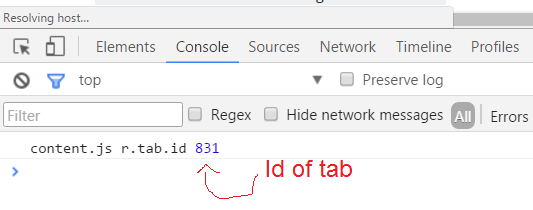
Check ▼
Full patch–:
≪bg.js≫:
console.log('bg.js, start');
chrome.runtime.onMessage.addListener((msg, sender_info, Reply)=> {
    console.log('bg.js, start, cb chrome.runtime.onMessage.addListener');
    console.log('bg.js', 'sender_info', sender_info);
    console.log('bg.js', 'sender_info.id', sender_info.id);
    console.log('bg.js', 'sender_info.url', sender_info.url);
    console.log('bg.js', 'sender_info.frameId', sender_info.frameId);
    console.log('bg.js', 'sender_info.tlsChannelId', sender_info.tlsChannelId);
    console.log('bg.js', 'sender_info.tab', sender_info.tab);
    console.log('bg.js', 'sender_info.tab.url', sender_info.tab.url);
    console.log('bg.js', 'sender_info.tab.favIconUrl', sender_info.tab.favIconUrl);
    console.log('bg.js', 'sender_info.tab.title', sender_info.tab.title);
    console.log('bg.js', 'sender_info.tab.incognito', sender_info.tab.incognito);
    console.log('bg.js', 'sender_info.tab.status', sender_info.tab.status);
    console.log('bg.js', 'sender_info.tab.width', sender_info.tab.width);
    console.log('bg.js', 'sender_info.tab.height', sender_info.tab.height);
    console.log('bg.js', 'sender_info.tab.id', sender_info.tab.id);
    console.log('bg.js', 'sender_info.tab.windowId', sender_info.tab.windowId);
    console.log('bg.js', 'sender_info.tab.sessionId', sender_info.tab.sessionId);
    console.log('bg.js', 'sender_info.tab.openerTabId', sender_info.tab.openerTabId);
    console.log('bg.js', 'sender_info.tab.pinned', sender_info.tab.pinned);
    console.log('bg.js', 'sender_info.tab.audible', sender_info.tab.audible);
    console.log('bg.js', 'sender_info.tab.mutedInfo', sender_info.tab.mutedInfo);
    console.log('bg.js', 'sender_info.tab.mutedInfo.muted', sender_info.tab.mutedInfo.muted);
    console.log('bg.js', 'sender_info.tab.mutedInfo.extensionId', sender_info.tab.mutedInfo.extensionId);
    console.log('bg.js', 'sender_info.tab.mutedInfo.reason', sender_info.tab.mutedInfo.reason);
    console.log('bg.js', 'sender_info.tab.highlighted', sender_info.tab.highlighted);
    console.log('bg.js', 'sender_info.tab.active', sender_info.tab.active);
    console.log('bg.js', 'sender_info.tab.discarded', sender_info.tab.discarded);
    console.log('bg.js', 'sender_info.tab.autoDiscardable', sender_info.tab.autoDiscardable);
    Reply(sender_info);
    console.log('bg.js, end, cb chrome.runtime.onMessage.addListener');
});
console.log('bg.js, end');
≪content.js≫:
console.log('content.js, start');
chrome.runtime.sendMessage('', (r)=> {
    console.log('content.js, start, cb chrome.runtime.sendMessage');
    console.log('content.js', 'r', r);
    console.log('content.js', 'r.id', r.id);
    console.log('content.js', 'r.url', r.url);
    console.log('content.js', 'r.frameId', r.frameId);
    console.log('content.js', 'r.tlsChannelId', r.tlsChannelId);
    console.log('content.js', 'r.tab', r.tab);
    console.log('content.js', 'r.tab.url', r.tab.url);
    console.log('content.js', 'r.tab.favIconUrl', r.tab.favIconUrl);
    console.log('content.js', 'r.tab.title', r.tab.title);
    console.log('content.js', 'r.tab.incognito', r.tab.incognito);
    console.log('content.js', 'r.tab.status', r.tab.status);
    console.log('content.js', 'r.tab.width', r.tab.width);
    console.log('content.js', 'r.tab.height', r.tab.height);
    console.log('content.js', 'r.tab.id', r.tab.id);
    console.log('content.js', 'r.tab.windowId', r.tab.windowId);
    console.log('content.js', 'r.tab.sessionId', r.tab.sessionId);
    console.log('content.js', 'r.tab.openerTabId', r.tab.openerTabId);
    console.log('content.js', 'r.tab.pinned', r.tab.pinned);
    console.log('content.js', 'r.tab.audible', r.tab.audible);
    console.log('content.js', 'r.tab.mutedInfo', r.tab.mutedInfo);
    console.log('content.js', 'r.tab.mutedInfo.muted', r.tab.mutedInfo.muted);
    console.log('content.js', 'r.tab.mutedInfo.extensionId', r.tab.mutedInfo.extensionId);
    console.log('content.js', 'r.tab.mutedInfo.reason', r.tab.mutedInfo.reason);
    console.log('content.js', 'r.tab.highlighted', r.tab.highlighted);
    console.log('content.js', 'r.tab.active', r.tab.active);
    console.log('content.js', 'r.tab.discarded', r.tab.discarded);
    console.log('content.js', 'r.tab.autoDiscardable', r.tab.autoDiscardable);
    console.log('content.js, end, cb chrome.runtime.sendMessage');
});
console.log('content.js, end');
Related videos on Youtube
 07 : 33
 02 : 54
 03 : 52
 03 : 08
 02 : 02
 03 : 40

Anonymous
Updated on July 17, 2020Comments
-
Anonymous over 2 years
chrome.tabs.getapparently doesn't work in the content script, and other than sending it throughchrome.extension.sendRequestI've no idea how to make the background respond to the correct tab.How can I make the content script send information to the background page, then the background page return information back to the tab where it came from?
-
 Emrys Myrooin almost 8 yearsIf someone want to use this solution, pay attention that this method is deprecated. Use chrome.runtime.onMessage instead
 -
 Asim K T over 7 yearschrome.tabs.getSelected is also deprecated since Chrome 33. Please use tabs.query {active: true}. developer.chrome.com/extensions/tabs#method-query