Android Studio: Resolving Duplicate Classes
Solution 1
Sometimes duplicate classes exception means that one of your dependencies uses implicitly the older or newer (with +) version of some library you also use in your project,
To resolve this issue you may add such block of code (put your library version after 'force') to your build.gradle file (Module:app):
configurations {
   all {
      resolutionStrategy {
          // do not upgrade above 3.12.0 to support API < 21 while server uses
          // COMPATIBLE_TLS, or okhttp3 is used in project
          force 'com.squareup.okhttp3:okhttp:3.12.0'
          force 'com.squareup.okhttp3:logging-interceptor:3.12.0'
      }
   }
}
You may also exclude some group from your dependencies. For a single dependency you way write:
dependencies {
    // example
    implementation('log4j:log4j:1.2.15') {
        exclude group: 'javax.jms', module: 'jms'
    }
}
Tested to work on Android Studio with Gradle Plugin version 3.4.2 and Gradle version 5.4.1.
Credits go to Dimitar Dimitrov and Schalk Cronjé from gradle org discussion group
Solution 2
its because you have added some Library two times in libs folder, this could happen sometimes when you have multiple versions of same library in libs folder. Check it and remove any duplicate jar file.
and second option could be you have also added the dependency in gradle.build and also have jar in libs folder.
So check both places and remove duplicate entries and the clean and build APK again.
Hope it helps
Solution 3
Delete files with duplicate jar extensions in the libs folder. However, if there are no duplicate files and there is still a "Duplicate classes" error, look for the name in the rest of the "Duplicate classes ...." clause in the error section. For example, "duplicated classes 'dagger' bla bla". Delete the file named 'dagger' from the libs folder. (Be careful not to delete it with shift.)
Solution 4
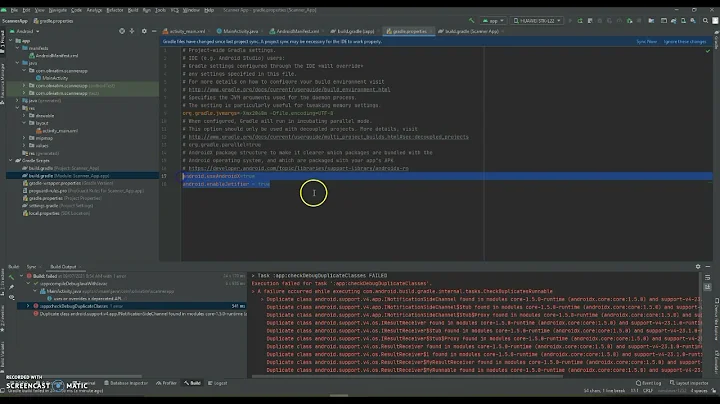
I added this line to my gradle.properties file and my app worked
android.enableJetifier=true
Solution 5
In my case, I am using sensorocloud.jar and the compile 'com.loopj.android:android-async-http:1.4.9' in my gradle which caused the same error as yours. Because sensoro cloud SDK used loopj's async-http.
I managed to solve it by manually removing the duplicate .class files in the jar file. (i.e.
- changing the extension from jar to zip
- extract it
- remove the
com.loopj.android.classfiles)
(P.S. I have tried to search through the web to see if I could exclude certain class of a jar in gradle, but not succeed, e.g. I referenced this SO post)
Related videos on Youtube
 05 : 09
 01 : 49
 02 : 30
 03 : 47
 10 : 17

Afflatus
Updated on July 05, 2022Comments
-
Afflatus 6 months
When I try to
runmy android application on an Android device, the gradle console reports the following error:Error:Execution failed for task ':app:transformClassesWithJarMergingForDebug'. > com.android.build.api.transform.TransformException: java.util.zip.ZipException: duplicate entry: com/loopj/android/http/AsyncHttpClient$1.classWhen I search for the "AsyncHttpClient" class, I see that it's indeed being found in two separate locations:
/Users/Afflatus/.gradle/caches/modules-2/files-2.1/com.loopj.android/android-async-http/1.4.9/5d171c3cd5343e5997f974561abed21442273fd1/android-async-http-1.4.9-sources.jar!/com/loopj/android/http/AsyncHttpClient.java
/Users/Afflatus/.ideaLibSources/android-async-http-1.4.9-sources.jar!/com/loopj/android/http/AsyncHttpClient.java
The first path seems to suggest it's a "cache" file... so I've tried
invalidating & restarting my cache, but both files are still there after the gradle gets rebuilt and I try torunthe application. I've read in alternate posts that it can be resolved by deleting one of the files... So I went to the cache location and deleted all the files found in the "1.4.9" folder... unfortunantly after reopening Android Studio, a new cache file gets created and I get the same error.Other posts (here, here,here, and here) suggest if I add "./gradlew clean" to the root directory it would rebuild the gradle again just for the run (as far as I understand). So I tried doing that as well:
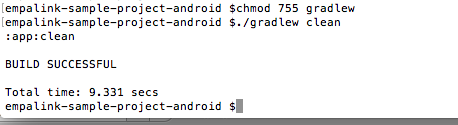
Which made my app's folder look like this:
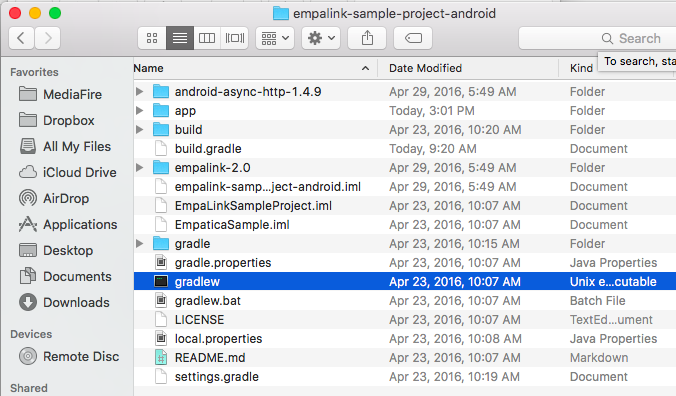
But unfortunantly, that didn't help things I still get the same error. What am I doing wrong? What should I be doing?
-
 chubao over 6 yearsMay I know how did you solve your problem, I got exactly the same problem as yours.
 -
Afflatus over 6 years@DavidCheung I don't think I solved it. I think I tried Anders' suggestions but nothing seemed to work for my particular case. Maybe it will for yours?
-
-
 amdstorm over 6 yearsDoes this work for you to exclude a class packagingOptions { exclude 'okhttp-2.0.0.jar' exclude 'crashlytics.jar' exclude 'DimenRes.class' exclude 'support-v4' exclude 'AccessToken$1.class' }
 -
chubao over 6 yearsI do not think it is related to the exclusion you mentioned.
-
 Walter Martin Vargas-Pena over 3 yearswhat is the location of the
libsfolder? root of project? -
Sayyed Rizwan over 2 yearshow to use
implementation project(path: ':videocropper')after force it's not working with project path.. Please tell me how to make work with it. -
 Denis Dmitrienko over 2 yearsAccording to the logs in your question here: stackoverflow.com/questions/61619084/… try to exclude group: "com.googlecode.mp4parser", module: "isoparser" as described above and write back if it helps
 -
 Atiq over 2 yearsIt is ProjectFolder/app/libs
 -
 Raghav Sharma about 2 yearsCan we use exclude with the local .aar files and exclude the duplicated code from one of the 2 .aar files?
 -
 toby yeats 11 monthsWhat is jms and why are you excluding it, how is it related to the original error? Why is the module jms? Why is the group javax.jms? Where did this information come from?
 -
 m'hd semps 6 monthsPrecisely, this did it for me