Are there bookmarks in Visual Studio Code?
Solution 1
Yes, via extensions. Try Bookmarks extension on marketplace.visualstudio.com
Hit Ctrl+Shift+P and type the install extensions and press enter, then type Bookmark and press enter.
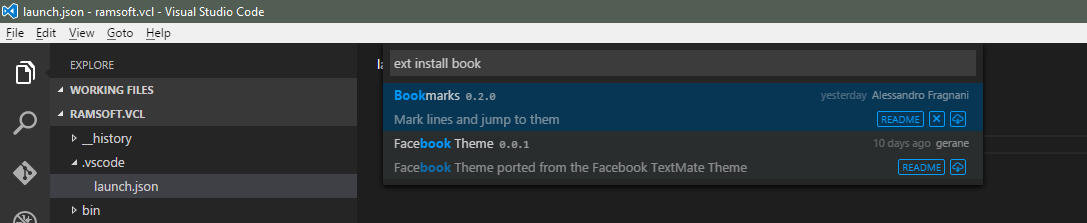
Next you may wish to customize what keys are used to make a bookmark and move to it. For that see this question.
Solution 2
You need to do this via an extension as of the version 1.8.1.
-
Go to View → Extensions. This will open Extensions Panel.
-
Type
bookmarkto list all related extensions. -
Install
I personally like "Numbered Bookmarks" - it is pretty simple and powerful.
Go to the line you need to create a bookmark.
Click Ctrl + Shift + [some number]
Ex: Ctrl + Shift + 2
Now you can jump to this line from anywhere by pressing Ctrl + number
Ex: Ctrl + 2
Solution 3
Visual Studio Code currently does not support bookmarks natively. Please add this as feature request to our Git Hub issue list (https://github.com/Microsoft/vscode).
In the meantime there are some ways to navigate around the code based on your navigation history. You can Ctrl+Tab to quickly jump to previously opened files. You can also navigate within your code based on cursor positions using Goto | Back and Goto | Forward.
Solution 4
Both VS Code extensions can be used:
- 'Bookmarks'
- 'Numbered Bookmarks'
Personally, I'm suggesting: Numbered Bookmarks, with 'navigate through all files' option:
- ctrl + Shift + P in VS Code
- In newly open field, type: Open User Settings
- Paste this key/value: "numberedBookmarks.navigateThroughAllFiles": "allowDuplicates" (allow duplicates of bookmarks),
- Or, paste this key/value: "numberedBookmarks.navigateThroughAllFiles": "replace"
NOTE
Either way, be careful with shortcuts (Ctrl+1, Ctrl+Shift+1,..) that are already assigned.
Personally, mine were in 2 conflicts, with:
- VS Code shortcuts, that already exists,
- Ditto clipboard (I've got paste on each call of bookmark)
Solution 5
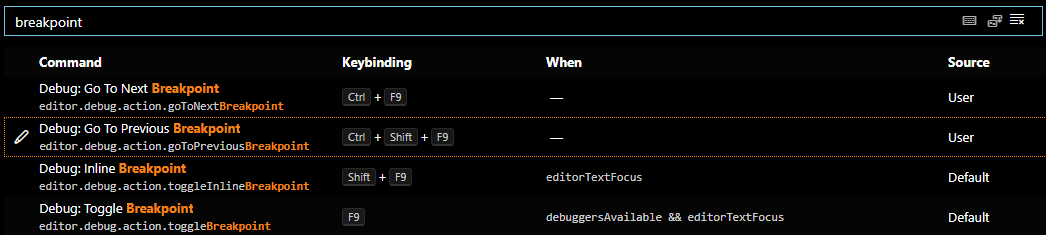
The bookmarks extension mentioned in the accepted answer conflicts with toggling breakpoints via the margin.
You could do the same with breakpoints and select the debug tab on the left to see them listed. Better yet, use File, Preferences, Keyboard Shortcuts and set (Shift+)Ctrl+F9 to navigate between them, even across files:

Rheinprinz
Updated on November 16, 2020Comments
-
Rheinprinz about 2 years
How can I set bookmarks in Visual Studio Code? I can't find any keyboard shortcuts.
Or is there anything else that I can use instead?
-
 Warren P about 7 yearsThe uservoice request became a request for an extension. It is now marked as "done". See my answer for how to install the extension and then set what keyboard shortcuts are used for it.
 -
Rheinprinz over 6 yearsBookmarks now navigate through all files. Numbered bookmarks still miss this important feature.
-
Warren P over 6 yearsAre you asking for it to NOT navigate through all files? If I remember correctly the Bookmarks extension above is not numbered, and the reason I don't want to use Numbered bookmarks is it's just another mental bit of trivia that distracts me. I just want un-numbered ones. You also? Or you are different?
-
Warren P over 6 yearsSo do Numbered bookmarks offer a different keyboard shortcut per bookmark?
-
Rheinprinz over 6 yearsYes they do. You can determine maximum 10 bookmarks. But that is enough, for your work context.
-
 Juha Palomäki almost 6 yearsOne drawback with "Numbered bookmarks" for some use cases is that the bookmarks are per file. Meaning you can't jump to another file using this extension. A feature request to implement this: github.com/alefragnani/vscode-numbered-bookmarks/issues/6
 -
 beavel over 5 years@WarrenP Can you add a reference to the built-in feature? Just searched for this and I'm not seeing bookmarks. Hit F1, typed 'bookmark' and I'm not getting results in VS Code. Searching docs and I'm not seeing it there either. Did they rename?
 -
 crayzeewulf over 5 years@WarrenP, just to confirm, this is incorrect: "Update: They are now built in (since late 2015).", right? In other words, there is no such thing as built-in bookmarks. Do you mind removing that statement from the answer if it is indeed incorrect? Thanks!
 -
 Sergio Belevskij over 5 yearsUsefull hint for me. Working in Visual Studio Code 1.14.2 Thank you!
 -
 Charlie about 5 years@Green They do work! Please follow the instructions in the answer.
 -
 SridharKritha almost 5 yearsNumbered Bookmarks 0.11.0 do supports navigation across the files. In user setting add the line - "numberedBookmarks.navigateThroughAllFiles": "allowDuplicates"
 -
 Raheel Hasan almost 5 yearsbest thing ever
 -
 Andrzej Martyna almost 5 yearsHow to navigate through all files? Next/Prev navigates through current file only. Fortunately the extension adds "Bookmarks" section in VS Code Explorer so I can manually switch to another file. Not optimal but useful.
 -
 Mark Carpenter Jr over 4 yearsUnfolding the file in the Bookmarks section of the Files Bar lists all the bookmarks by line number, with a peek at the line's contents.
 -
 user1941537 over 4 yearsI'm using Numbered Bookmarks, but on Mac the short cut Shift + Cmd + 3 and Shift + Cmd + 4 are already assigned for taking a screen shot.
 -
 Avatar almost 4 years"Next you may wish to customize what keys are used to make a bookmark and move to it." – It would be great if the default shortcuts would be within the readme file. Nothing mentioned, thus useless. – Edit: Found out how to set the bookmark:
CTRL+ALT+K.CTRL+ALT+Jto jump to it. -
 moodboom almost 4 yearsNote that there are three settings for navigateThroughAllFiles. The "allowDuplicates" option will allow multiple bookmarks of the same number across different files, from what I understand. The "replace" option works much better for me - one set across all files. Nice.
 -
 TH Todorov over 3 yearsTyping "install extensions" and hitting Enter - check before doing that, disabled all my extensions
 -
Aldo Bassanini almost 3 years+1 for Numbered Bookmarks marketplace.visualstudio.com/…" Great Extension!!!
-
 Itamar Katz almost 3 yearsthe bookmark label (that little blue thing) sits on top of the red breakpoint circle, you can't toggle both... I can put the bookmark one line above (as a hack) but isn't there a more elegant solution?
 -
 Reversed Engineer over 2 yearsThanks for this tip! We've had numbered bookmarks (same hotkeys) in the Delphi IDE since the 90's. At last MS gets with the program. Maybe Anders Hejlsberg forget about them when Bill Gates paid him all that money to go to the dark side.
 -
 sktguha about 2 years@user1941537 yes I am facing this issue also. Any solution for this ?
 -
 Azghanvi almost 2 yearsVery embarrassing, a most famous code editor with no native bookmark support.
 -
 Arie 10 monthsCan i somehow give a name to the bookmark and see bookmarks on some list?
 -
 Joe the Coder 10 monthsTo work around toggling breakpoints on a bookmarked line, just press F9 (toggles breakpoint).
 -
 Stevoisiak 10 monthsOn macOS the Command Palette shortcut is Cmd+Shift+P.
 -
 essential 7 monthsSorry, but this is misleading, ctrl+shift+n creates a new document.. As other people said, there is only possibility with installing extension.