CMake: Visual Studio 15 2017 could not find any instance of Visual Studio
Solution 1
I ran into the same error and performed the following steps to resolve the issue:
- Open Visual Studio
- Go to Tools -> Get Tools and Features
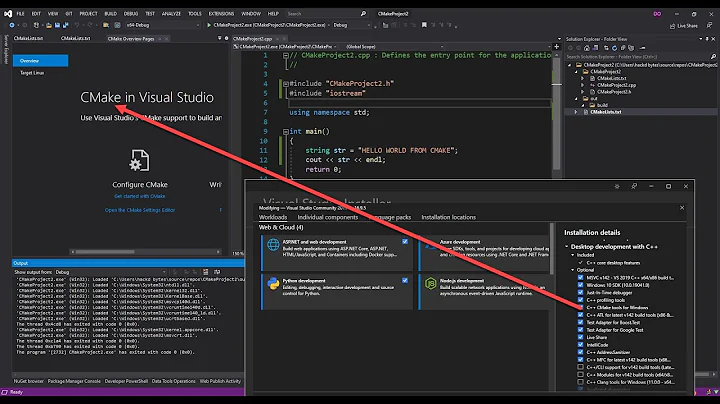
- In the "Workloads" tab enable "Desktop development with C++"
- Click Modify at the bottom right
These steps resulted in the "Visual C++ tools for CMake" feature being installed, but the other optional C++ features included in this workload may also helpful for what you are trying to do.
After the Visual Studio updater finishes installing try re-running the command. You may need to open a new command window.
Solution 2
In my case, I installed Visual Studio, selecting the workloads and modules that I wanted, but I ignored the request to reboot, assuming that shutting down the computer at the end of the day and restarting it the following day would suffice. I was wrong.
The following day I tried a cmake build and got the "could not find any instance of Visual Studio" error. After several attempts to resolve, I re-ran the installer, made no changes to the configuration, and clicked Modify. This time I let it reboot the computer. The reboot took a long time. After which my cmake build worked.
Solution 3
I had the same issue "could not find any instance of Visual Studio"
but with Visual Studio 2019 (Community Edition) and I just had to configure the VS160COMNTOOLS variable so that CMake correctly detects Visual Studio.
export VS160COMNTOOLS="/c/Program Files (x86)/Microsoft Visual Studio/2019/Community/Common7/Tools"
(cf https://cmake.org/cmake/help/latest/generator/Visual%20Studio%2016%202019.html)
With Visual Studio 15 2017, the variable you need should be VS150COMNTOOLS.
(cf https://cmake.org/cmake/help/latest/generator/Visual%20Studio%2015%202017.html)
NB: in my case, in a Travis-CI workflow, I installed Visual Studio using the commands (no need to reboot):
choco install visualstudio2019community
choco install visualstudio2019-workload-nativedesktop # required
With only the first package, CMake detection of VS2019 failed.
Solution 4
I was configuring a Jenkins build node and could successfully run CMake GUI manually but command line use or builds using the CMake plugin would fail with:
Visual Studio 16 2019 could not find instance of Visual Studio.
-A x64 parameter was added with no change in result.
The problem was that CMake could not determine the Windows SDK version. By adding CMAKE_SYSTEM_VERSION parameter CMake was then able to find Visual Studio.
-D CMAKE_SYSTEM_VERSION=10.0.18362.0 (use your windows SDK version)
Environment: windows 10 system build: 19042 CMAKE 3.19.4 VS 2019 Professional 16.8.4 Jenkins 2.235.1
Full command line that worked: "C:\Program Files\CMake\bin\cmake" -G "Visual Studio 16 2019" -D CMAKE_BUILD_TYPE=Release -A x64 -D CMAKE_SYSTEM_VERSION=10.0.18362.0
Related videos on Youtube
 05 : 23
 04 : 28
 09 : 37
 02 : 24
 05 : 08

barkman345
Updated on February 01, 2022Comments
-
barkman345 11 months
When I am trying to install CMake I get the error:
Visual Studio 15 2017 could not find any instance of Visual Studio.I am using Windows 7 and Visual Studio 2017. The
CMakeOutput.logfile writes:The system is: Windows - 6.1.7601 - AMD64Any ideas?
-
 Violet Giraffe about 4 yearsThat was it. I've had most of the C++ stuff, but the "Visual C++ tools for CMake" were missing. Thank you.
 -
 Gerard097 about 4 yearsI have installed it, but still getting the error. I'm not sure but maybe it is related to uninstalled cmake 3.12 and then installed 3.13
 -
 rbaleksandar over 2 yearsI installed Visual Studio 2019 with all those settings enabled and still getting this error. Have the latest cmake version (3.16.5), which should be fine given the recommendation for a lower version and above for cmake in the installer of VS itself.
 -
Metric Crapton almost 2 yearsThis worked for me. Thanks! Should be the accepted answer.
-
 user1770426 over 1 yearThis is it :-) This answer should be pinned to the beginning of the every stackoverflow question which starts with "cmake cannot detect visual studio".
 -
 ZF007 about 1 yearIf above solution is removed as answer your answer should include the key essentials to understand what was going on "back then". End of Review.
 -
hobbydev 11 monthsIn Visual Studio 2015, there is no menu Tools -> Get Tools and Features.
-
 Ajay Maity 11 monthsAfter endless hours on the internet, this answer solved the issue for me :) Thanks!!