COMRESET failed (errno=-16)
Boot from live media and see if you have the same issue. If not, it points to a software problem, If so you have a hardware problem read on.
Identify your model and check the connection between the system board and the hard drive. If it's a cable replace it, if not ensure that the socket isn't loose on the mainboard and the drive is properly seated. If possible test the drive in another system with known good connections to determine whether the issue follows the drive, if so replace it. If anything about this answer is unclear, drop me a comment and I'll do my best to clarify.

Comments
-
user1121883 8 months
Sometimes when I open my laptop secondary HDD doesn't mount. The startup time is also very long. If I shut it down and restart it may work. I found the following error but I don't know how to fix it. I use Ubuntu 16.04.3 LTS. The HDD is Seagate ST2000LM007 2TB SATA Hard Drive mounted in an HP Omen.
 dmesg |grep ata2
[    1.301925] ata2: SATA max UDMA/133 abar m2048@0xb4434000 port 0xb4434180 irq 129
[    1.618501] ata2: SATA link up 6.0 Gbps (SStatus 133 SControl 300)
[    1.629519] ata2.00: ATA-10: ST2000LM007-1R8174, RDM4, max UDMA/100
[    1.629520] ata2.00: 3907029168 sectors, multi 16: LBA48 NCQ (depth 31/32), AA
[    1.652483] ata2.00: configured for UDMA/100
[   22.834992] ata2.00: exception Emask 0x0 SAct 0x0 SErr 0x0 action 0x6 frozen
[   22.834996] ata2.00: failed command: IDENTIFY DEVICE
[   22.834998] ata2.00: cmd ec/00:01:00:00:00/00:00:00:00:00/00 tag 9 pio 512 in
[   22.834999] ata2.00: status: { DRDY }
[   22.835013] ata2: hard resetting link
[   28.195015] ata2: link is slow to respond, please be patient (ready=0)
[   32.874978] ata2: COMRESET failed (errno=-16)
[   32.874983] ata2: hard resetting link
[   38.235030] ata2: link is slow to respond, please be patient (ready=0)
[   42.926952] ata2: COMRESET failed (errno=-16)
[   42.926956] ata2: hard resetting link
[   48.283032] ata2: link is slow to respond, please be patient (ready=0)
Also a few time while working:
[    1.337312] ata2: SATA max UDMA/133 abar m2048@0xb4434000 port 0xb4434180 irq 128
[    1.650864] ata2: SATA link up 6.0 Gbps (SStatus 133 SControl 300)
[    1.661902] ata2.00: ATA-10: ST2000LM007-1R8174, RDM4, max UDMA/100
[    1.661903] ata2.00: 3907029168 sectors, multi 16: LBA48 NCQ (depth 31/32), AA
[    1.684796] ata2.00: configured for UDMA/100
[  158.780788] ata2.00: exception Emask 0x0 SAct 0x1e SErr 0x0 action 0x6 frozen
[  158.780798] ata2.00: failed command: WRITE FPDMA QUEUED
[  158.780808] ata2.00: cmd 61/40:08:00:69:c0/05:00:68:00:00/40 tag 1 ncq dma 688128 out
[  158.780813] ata2.00: status: { DRDY }
[  158.780816] ata2.00: failed command: WRITE FPDMA QUEUED
[  158.780823] ata2.00: cmd 61/c0:10:40:6e:c0/02:00:68:00:00/40 tag 2 ncq dma 360448 out
[  158.780827] ata2.00: status: { DRDY }
[  158.780830] ata2.00: failed command: WRITE FPDMA QUEUED
[  158.780837] ata2.00: cmd 61/40:18:00:71:c0/05:00:68:00:00/40 tag 3 ncq dma 688128 out
[  158.780840] ata2.00: status: { DRDY }
[  158.780843] ata2.00: failed command: WRITE FPDMA QUEUED
[  158.780849] ata2.00: cmd 61/c0:20:40:76:c0/02:00:68:00:00/40 tag 4 ncq dma 360448 out
[  158.780853] ata2.00: status: { DRDY }
[  158.780859] ata2: hard resetting link
[  164.138013] ata2: link is slow to respond, please be patient (ready=0)
[  168.819468] ata2: COMRESET failed (errno=-16)
[  168.819476] ata2: hard resetting link
[  174.176956] ata2: link is slow to respond, please be patient (ready=0)
[  178.857942] ata2: COMRESET failed (errno=-16)
[  178.857948] ata2: hard resetting link
[  184.227221] ata2: link is slow to respond, please be patient (ready=0)
[  213.866965] ata2: COMRESET failed (errno=-16)
[  213.866975] ata2: limiting SATA link speed to 3.0 Gbps
[  213.866977] ata2: hard resetting link
[  218.927156] ata2: COMRESET failed (errno=-16)
[  218.927163] ata2: reset failed, giving up
[  218.927165] ata2.00: disabled
[  218.927183] ata2: EH complete
I also formatted these partitions but it still fails. If I use a fresh ubuntu install it works for a few days without any issue.
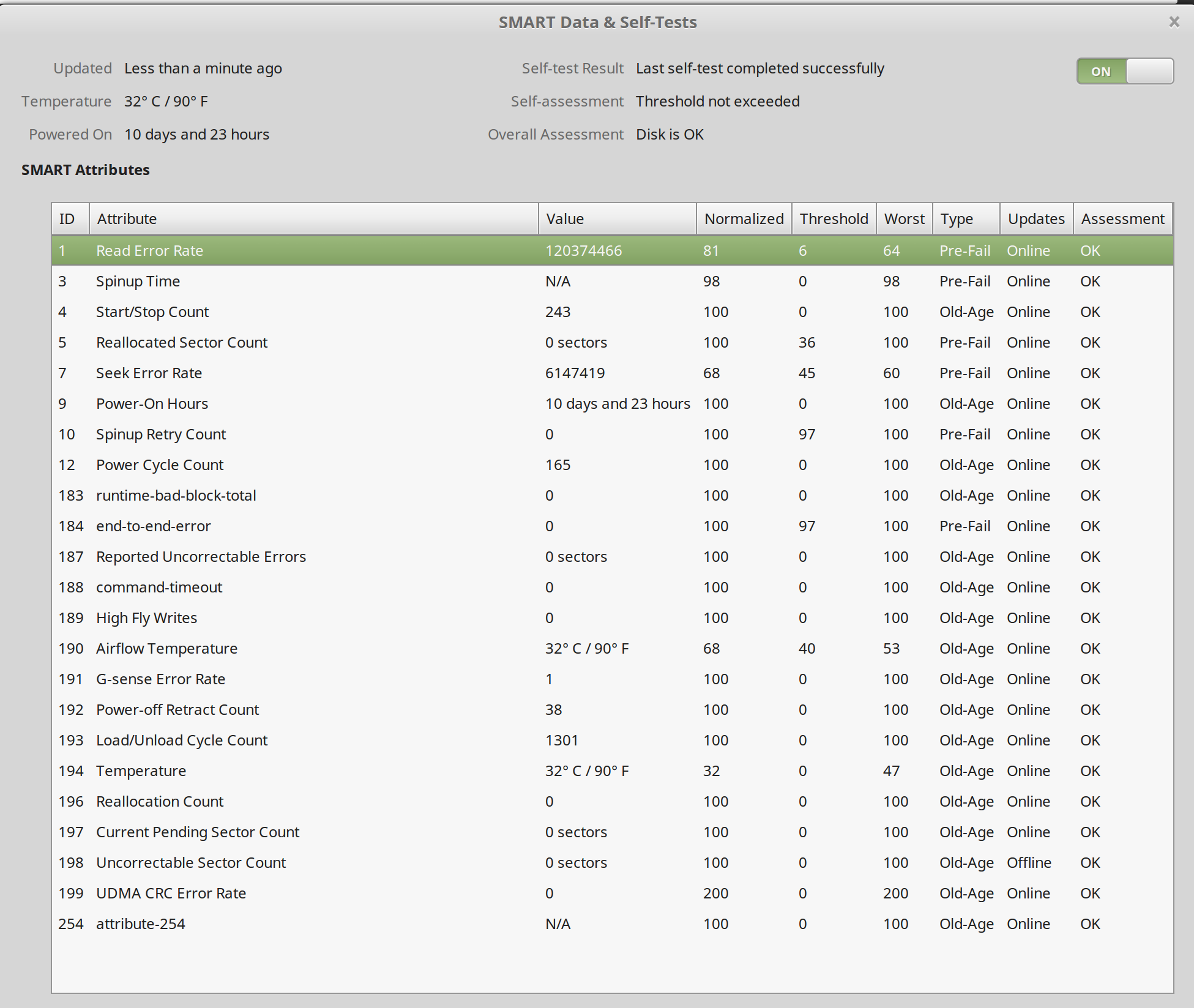
Smart extended test:
-
 Robert Riedl over 5 yearsHave you tried this yet ?
 -
user1121883 over 5 years@RobertRiedl yes, I ran fsck and didn't found any issue
-
Robert Riedl over 5 yearsMaybe HW related, can you do a SMART test of the HDD and post the results?
-
user1121883 over 5 years@RobertRiedl running now the short one; extended one probably by tomorrow
-
user1121883 over 5 years@RobertRiedl added pic for short one
-
Robert Riedl over 5 yearsThe short scan looks fine, but you could do a long one to make sure. There are some very recent (two weeks ago) firmware releases for your HDD that explicitly mention "crashes due to power loss" - you should definitely give that a look!
-
Robert Riedl over 5 yearsLet us continue this discussion in chat.
-
Robert Riedl over 5 yearsI'm on mobile so I can't use chat: before you install windows, search for windows live CDs called ’PE’ !
-
 Elder Geek over 5 yearsHave you checked to see if your secondary hard drive is properly mounted physically? This sounds very much like a loose connection between the drive and the system.
 -
user1121883 over 5 years@ElderGeek will open the laptop also check this.
-
 WinEunuuchs2Unix over 5 yearsDo you have the file
/etc/default/tlpon your system? -
user1121883 over 5 years@WinEunuuchs2Unix no, i don't ll /etc/default/tlp ls: cannot access '/etc/default/tlp': No such file or directory
-
WinEunuuchs2Unix over 5 years@user1121883 Just checking to see if it was worthwhile investigating problems with
tlpbut you don't have it installed so that's a dead-end. -
Robert Riedl over 5 yearsWhat make and model is your laptop ?
-
user1121883 over 5 years@RobertRiedl full specs: HP OMEN 15 UHD 4K Gaming Laptop (Intel i7 Quad Core, 2TB HDD +128GB SSD, 15.6 inch UHD 3840 x 2160, 32GB RAM, GeForce GTX 1050 Ti, Win 10) it was upgraded by MichaelElectronics2
-
Robert Riedl over 5 yearsI'm with @ElderGeek, please check the physical connection. If you can do that yourself, pay close attention to the part that connects to the mainboard, see the manual here, page 39 and 40. It seems to be a very small and kind of flimsy connector
-
Elder Geek over 5 yearsWhat is you exact HP model # ? there are several HP OMEN 15 UHD 4K Gaming Laptop models. if you could identify it we would have far better odds of providing you with an accurate answer. Thank you for helping us help you!
-
-
user1121883 over 5 yearsi can't reproduce the issue at each restart. It's quite random. it works fine on live usb. this is the exact laptop: amazon.com/gp/product/B01J8X6IVY/…
-
Elder Geek over 5 yearsSadly that doesn't tell me the HP model number. The random nature of the problem indicates to me an increased likelihood of a connection problem however.