Find unused npm packages in package.json
Solution 1
You can use an npm module called depcheck (requires at least version 10 of Node).
-
Install the module:
npm install depcheck -g or yarn global add depcheck -
Run it and find the unused dependencies:
depcheck
The good thing about this approach is that you don't have to remember the find or grep command.
To run without installing use npx:
npx depcheck
Solution 2
There is also a package called npm-check:
npm-check
Check for outdated, incorrect, and unused dependencies.
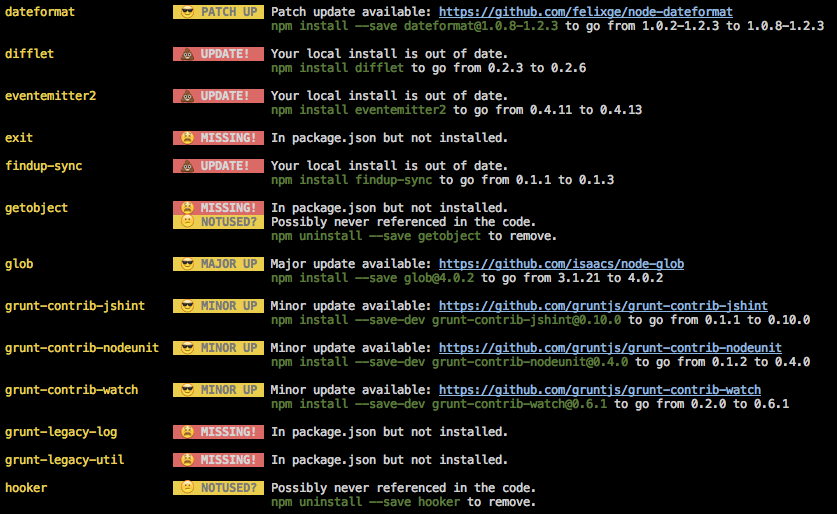
It is quite powerful and actively developed. One of it's features it checking for unused dependencies - for this part it uses the depcheck module mentioned in the other answer.
Solution 3
Check the unused dependencies
npm install depcheck -g
depcheck

Check the outdated library
npm outdated

Solution 4
The script from gombosg is much better then npm-check.
I have modified a little bit, so devdependencies in node_modules will also be found.
example sass never used, but needed in sass-loader
#!/bin/bash
DIRNAME=${1:-.}
cd $DIRNAME
FILES=$(mktemp)
PACKAGES=$(mktemp)
# use fd
# https://github.com/sharkdp/fd
function check {
    cat package.json \
        | jq "{} + .$1 | keys" \
        | sed -n 's/.*"\(.*\)".*/\1/p' > $PACKAGES
    echo "--------------------------"
    echo "Checking $1..."
    fd '(js|ts|json)$' -t f > $FILES
    while read PACKAGE
    do
        if [ -d "node_modules/${PACKAGE}" ]; then
            fd  -t f '(js|ts|json)$' node_modules/${PACKAGE} >> $FILES
        fi
        RES=$(cat $FILES | xargs -I {} egrep -i "(import|require|loader|plugins|${PACKAGE}).*['\"](${PACKAGE}|.?\d+)[\"']" '{}' | wc -l)
        if [ $RES = 0 ]
        then
            echo -e "UNUSED\t\t $PACKAGE"
        else
            echo -e "USED ($RES)\t $PACKAGE"
        fi
    done < $PACKAGES
}
check "dependencies"
check "devDependencies"
check "peerDependencies"
Result with original script:
--------------------------
Checking dependencies...
UNUSED           jquery
--------------------------
Checking devDependencies...
UNUSED           @types/jquery
UNUSED           @types/jqueryui
USED (1)         autoprefixer
USED (1)         awesome-typescript-loader
USED (1)         cache-loader
USED (1)         css-loader
USED (1)         d3
USED (1)         mini-css-extract-plugin
USED (1)         postcss-loader
UNUSED           sass
USED (1)         sass-loader
USED (1)         terser-webpack-plugin
UNUSED           typescript
UNUSED           webpack
UNUSED           webpack-cli
USED (1)         webpack-fix-style-only-entries
and the modified:
Checking dependencies...
USED (5)         jquery
--------------------------
Checking devDependencies...
UNUSED           @types/jquery
UNUSED           @types/jqueryui
USED (1)         autoprefixer
USED (1)         awesome-typescript-loader
USED (1)         cache-loader
USED (1)         css-loader
USED (2)         d3
USED (1)         mini-css-extract-plugin
USED (1)         postcss-loader
USED (3)         sass
USED (1)         sass-loader
USED (1)         terser-webpack-plugin
USED (16)        typescript
USED (16)        webpack
USED (2)         webpack-cli
USED (2)         webpack-fix-style-only-entries
Solution 5
many of the answer here are how to find unused items.
what if.. I wanted to..
AUTOmatically -- a) find + b) Remove the unused items
Option 1:
- Install this node project.
$ npm install -g typescript tslint tslint-etc
- At the root dir, add a new file tslint-imports.json
{
  "extends": [
    "tslint-etc"
  ],
  "rules": {
    "no-unused-declaration": true
  }
}
- Run this at your own risk, make a backup :)
$ tslint --config tslint-imports.json --fix --project .
Option 2: Per @Alex
npx depcheck --json | jq '.dependencies[]' | xargs -L1 npm rm

Josh C
Updated on February 05, 2022Comments
-
Josh C 11 months
Is there a way to determine if you have packages in your
package.jsonfile that are no longer needed?For instance, when trying out a package and later commenting or deleting code, but forgetting to uninstall it, I end up with a couple packages that could be deleted.
What would be an efficient way to determine if a package could safely be deleted?
-
 Boern about 7 years
return new Promise(function (resolve, reject) {: ReferenceError: Promise is not defined... too bad. gonna go with npm-check -
 cyberwombat almost 7 yearsdepcheck-es6 is now merged into depcheck
 -
 phil294 almost 6 yearsdoesnt look useful. I am using the standard angular2 cli setup and
depchecklists every package asunusedwhich is just wrong -
 Westy92 almost 6 yearsI used this over npm-check because there's a module for gulp integration: github.com/depcheck/gulp-depcheck.
 -
lapint over 4 yearsThis package completely lagged down my Mac running High Sierra, I would not recommend using it.
-
Sakshi Nagpal over 4 yearsIt shows some dependencies as unused which are actually getting used such as babel-cli, css-loader, sass-loader and many more which are getting used in build process.
-
 Doug Domeny over 4 yearsFor typescript, install using
npm install -g depcheck typescript. However, even with this option, every dependency was listed as unused. -
 Alex K over 4 yearsSeems to give me the same results as depcheck. It looks like it even uses depcheck to find the unused dependencies.
 -
 Javier Arias about 4 yearsNB. depcheck doesn't take into account packages used in scripts specified in package.json
 -
 mgarde about 4 years
npm outdatedchecks and lists current, wanted and latest package versions. No list of unused packages though. -
Kiril about 4 yearsTo run it just once (w/o installation) - use npx:
npx depcheck -
 swateek about 4 yearsI had a grunt build, and this suggested to remove all grunt packages under devDependencies. Not a good idea :)
 -
 German Attanasio about 4 yearsThere is an option to ignore certain packages like
eslint-*orgulp-. -
sanjeev almost 4 yearsso now who will remove this
depcheck? -
 Atte Juvonen almost 4 yearsDoesn't work. I just ran
depcheckon my Gatsby project and it listed almost all of my packages asunusedeven though most of them are actually used. -
German Attanasio almost 4 years@AtteJuvonen there is a way to specify which pages should be skipped like
eslintorbabel. What are the packages that are being listed for you? -
Atte Juvonen almost 4 yearsIt lists a lot of packages that are actually used, including
gatsby-plugin-google-analyticsandtypescript. -
dev27 over 3 yearsDidn't work for me. It listed all the packages as unused.
-
 Kyle Burkett over 3 yearsdoesnt look useful as well. I am using the standard angular setup and this also lists every package as unused which is just as wrong
 -
 OZZIE over 3 yearsit revealed some not used ones but also used ones, still helpful I guess :-) It doesn't understand webpack loaders ;-)
 -
OZZIE about 3 yearsWhat about
.jsxfiles and.tsfiles etc :D -
OZZIE about 3 yearsApparently using this approach we are not using react module in our React app :D
-
angularrocks.com almost 3 yearsRunning on old angular project saying
No depcheck issuewhich is wrong as there is definitely some unused packages I can tell -
 vdiaz1130 almost 3 yearsEditors sometimes cause imports to wrap into multiple lines. Would this script catch statements where ‘import’ or ‘require’ would be on a different line than the ‘from “PACKAGE_NAME”’? In other words, does it ignore whitespace in import or require statements?
 -
Ayon Nahiyan over 2 yearsBut this is going to remove from the js files only. But ya still good.
-
 alex over 2 yearshow about
npx depcheck --json | jq '.dependencies[]' | xargs -L1 npm rm -
el-davo over 1 yearYeah same as the rest, finding depcheck is pretty useless to be honest, lists many packages that are in use as unused.
-
 jjmerelo over 1 yearSeems a bit outdated now. It includes high severity vulnerabilities right now...
 -
 Justin Dehorty over 1 yearAdding
-P 32switch to your xargs will result in a huge speedup. -
 Cameron Wilby over 1 yearBest solution compared to depcheck and derivatives. Adding
--max-procs|-P 32greatly improves the speed. -
 JCollier about 1 year
depcheckjacked up my dependencies pretty badly. I just blindly trusted it and removed the packages that it said were unused. My project still built, but there were unseen problems with removing the dependencies, and down the road, I had a lot of issues. -
 Manwe about 1 yearGreat script that nicely extended the orginal one, but it got unusable slow (even xargs -P options) on a large react app. Re-organized file searches and shared a version that should produce same output, but not necessary in the same order.
 -
 AndyW 12 monthstslint is deprecated as of 2019
 -
 daveD 11 monthsdepcheck didnt work for me. It listed some as unused, so I removed them. Then when I did a build, it failed to find the dependencies I just removed !!