how to set up default download location in youtube-dl
Solution 1
You need to use the -o switch with the Configuration file
Output on youtube-dl is handled with the --output or -o switch; pass it as an option, followed by the destination you want to save your downloads to:
youtube-dl -o '%USERPROFILE%\Desktop\%(title)s-%(id)s.%(ext)s' www.youtube.com/link/to/video
Note that -o has a dual function in that it also sets a template for how your output files will be named, using variables. In this example, it will output the title of the original downloaded video followed by the file extension, which is my personal preference. For all of the variables that can be used in a filename, have a look at the youtube-dl documentation here.
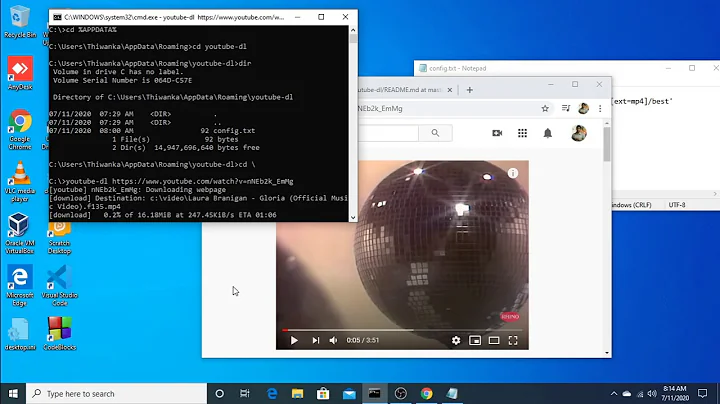
youtube-dl also allows use of a configuration file - a file that can be used to configure the switches you most frequently use so the program can pull them from there instead, saving you from having to explicitly call them each time you run it. This is what you'll need for the default download location that you're looking for. The configuration file can be used to set a default output destination so that you never have to explicitly set an output again.
To set up a configuration file for youtube-dl, assuming you have Windows:
-
In
%APPDATA%\Roaming, create ayoutube-dlfolder if one doesn't already exist. -
Inside that folder, create a plain text file named
config.txt. -
Place
youtube-dloptions in the file as you'd normally use them on the command line withyoutube-dl, placing each one on a new line. For example, for the output switch, you'd use:-o %USERPROFILE%\Desktop. For more on the Configuration file, read the documentation on it here.
Overriding the Configuration file
Even when an option is configured in a configuration file, it can be overridden by calling it explicitly from the command line. So, if you have -o set in a configuration file to be the default location for downloads, but want to save downloads to somewhere else for a current job, simply calling -o on the command line will override the configuration file for the current run of the program only.
Solution 2
I find a way to directly download files in Downloads folder. I search for long hours. I copied my entire function then you can understand the context around. Here is my code it will maybe helpful for someone:
import os
def download_audio(request):
    SAVE_PATH = '/'.join(os.getcwd().split('/')[:3]) + '/Downloads'
    ydl_opts = {
        'format': 'bestaudio/best',
        'postprocessors': [{
            'key': 'FFmpegExtractAudio',
            'preferredcodec': 'mp3',
            'preferredquality': '192',
        }],
        'outtmpl':SAVE_PATH + '/%(title)s.%(ext)s',
    }
    link = request.GET.get('video_url')
    with youtube_dl.YoutubeDL(ydl_opts) as ydl:
        ydl.download(["https://www.youtube.com/watch?v="+link])
Tell me if there is a problem.
Solution 3
According to the configuration documentation, you can configure youtube-dl with a global or user-specific configuration file:
You can configure youtube-dl by placing any supported command line option to a configuration file. On Linux and macOS, the system wide configuration file is located at
/etc/youtube-dl.confand the user wide configuration file at~/.config/youtube-dl/config. On Windows, the user wide configuration file locations are%APPDATA%\youtube-dl\config.txtorC:\Users\<user name>\youtube-dl.conf. Note that by default configuration file may not exist so you may need to create it yourself.
On linux, this would be your user config file:
# Save all my videos to the Videos directory:
-o ~/Videos/%(title)s.%(ext)s
Solution 4
Depending on your needs, I think moving the file afterwards would be just as usefull:
--exec CMD                       Execute a command on the file after
                                 downloading, similar to find's -exec
                                 syntax. Example: --exec 'adb push {}
                                 /sdcard/Music/ && rm {}'
By creating a function which will move the file
Solution 5
Here is the complete solution I use:
from youtube_dl import YoutubeDL
ydl_opts = {
   'format': 'best',
   'outtmpl': 'DIR-PATH-HERE%(title)s'+'.mp4',
   'noplaylist': True,
   'extract-audio': True,
}
video = "https://www.youtube.com/watch?v=SlPhMPnQ58k"
with YoutubeDL(ydl_opts) as ydl:
   info_dict = ydl.extract_info(video, download=True)
   video_url = info_dict.get("url", None)
   video_id = info_dict.get("id", None)
   video_title = info_dict.get('title', None)
   video_length = info_dict.get('duration')
# print(video_title)
Related videos on Youtube
 01 : 55
 02 : 22
 25 : 29

Comments
-
user101 11 months
how can I set default download location in youtube-dl so that everything that I download with youtube-dl goes into that default directory?
-
user101 over 7 yearsI just downloaded an entire playlist, where did it put the files?
-
 JAL over 7 yearsIn the directory where you ran the
youtube-dlcommand.
-
-
 Synetech about 7 yearsThe problem is that using the
-oswitch requires specifying the filename template. I don’t want to do that and would rather use the default (which includes more than just the title). There really should be an option to specify just the output directory (especially since youtube-dl is based on wget which has the-Pswitch for this). -
 phihag over 6 yearsyoutube-dl is not based on wget, and you can simply append
%(title)s-%(id)s.%(ext)sto your output template to get the default basename. -
 ejbytes over 2 years@phihag - that's exactly what I needed. I saw this post last week. I'm glad I read the comments this time. I think that' why the answer was not chosen. You should add your comment to this solution (as an edit solution) as it would be most helpful and a sweet addition.
 -
ejbytes over 2 years@phihag One more thing. I left a message above also. But, I just rant into a problem. I want to use -f options, but also -o and use your suggestion. It doesn't like that. You seem the right person to ask. Thx!
-
ejbytes over 2 years@phihag It was a bit more compolicated than just knowing the explicit command. I worked on it for a couple hours and realized that in order to use other parameters with this parameter you have to create a simple config file. I offered my solution as an answer for onlookers.
-
 Hashim Aziz over 2 yearsApart from the default basename that I have now edited into my answer as requested, your answer doesn't seem to add anything that isn't already in my answer, and what's more seems to introduce a lot of inaccuracies in the process. Firstly, the config file does not have to end in
.conf- only the user-specific config file does, which is only needed when you have several users using youtube-dl on the same machine and one of them wants to override the global config file. -
Hashim Aziz over 2 yearsSecondly, the way you mention the "native" filename makes me think you believe it's YouTube's own default, so to clarify, the default filename /basename is just an arbitrary default that the
youtube-dluses when there's no-ooption set, and if you're using-oanyway there's no reason you shouldn't just set it to the format you want. -
Hashim Aziz over 2 yearsLastly, there's no reason why you would need a config file for what you want to do here. I was able to run the following command without any issues:
youtube-dl -f best -o "%userprofile%/Desktop/DL/%(title)s-%(id)s.%(ext)s" --ignore-config https://www.youtube.com/watch?v=T6vKZhfI7qY- note the last option is making sure I'm not using my config file at all, and I still get the download as expected. The output directory doesn't even need to exist becauseyoutube-dlautomatically creates it. -
Hashim Aziz over 2 years@ejbytes The reason this answer wasn't accepted by the questioner was likely because I posted it in 2016, a year after they last logged in. I have edited
youtube-dl's default filename into the answer as you requested, but you should remember that this is an arbitrary default that's used byyoutube-dlwhen no-ooption is specified - if you're setting-oanyway, you may as well set the output filename how you want. My answer also explains the config file in some detail, but there's no reason you would need one to do what you're trying to do, as demonstrated in my comment to your answer. -
ejbytes over 2 years@Prometheus - yeah, one hit wonders that never come back. It's why I stopped contributing a couple years ago. I was bashing my brains out trying to get this to work in a batch file. Via cmd is straight forward. But trying to get weird stuff into variables and then using them is so difficult in batch script writing. I tried int via command line, works like a charm. But in the batch file took me a couple more hours to figure it out. Like adding the extra % from % to %%, which is reverse logic because cmd is usually one % and batch two %%. Weird!
-
ejbytes over 2 years@Prometheus You seem to know a lot about this. I'm really glad for you. But it's frustrating when there is no person demonstrating the various methods for a NIFTY executable file like this. I'm contributing. I'll leave it at that. I do appreciate the partial constructive criticism though. Thanks Zeus, I mean Prometheus, or was it Creator? Just kidding, God Bless.
-
 Levi H about 2 yearsIt's ridiculous you have to specify the entire format. It should just allow you to output it to a directory in the default format
 -
 Chang Zhao over 1 yearif we set up
-ooutput directory does it directly download to that location or downloads to different location temporarily and then move to the output directory ? -
 babipsylon over 1 yearI get an error when I add this to my code: youtube-dl --extract-audio --audio-format best --audio-quality 0 --embed-thumbnail --add-metadata --audio-format mp3 -o ' C:\Users\ruben\Spotify_playlists_downloads\%(title)s-%(id)s.%(ext)s' youtube.com/playlist?list=PL2dtgjRRrmS1LeAp_L3lthEp9AQq5Ns5O Cannot download a video and extract audio into the same file! Use "'.%(ext)s" instead of "'" as the output template
 -
 aschultz over 1 yearThis is very useful! I would like to add, as of January 2022, that an -o in a Windows file system needs you to have forward slashes. So -o c:\yt-transcripts = doesn't work, -o c:/yt-transcripts does.