Removing duplicate rows in Notepad++
Solution 1
Notepad++ with the TextFX plugin can do this, provided you wanted to sort by line, and remove the duplicate lines at the same time.
To install the TextFX in the latest release of Notepad++ you need to download it from here: https://sourceforge.net/projects/npp-plugins/files/TextFX
The TextFX plugin used to be included in older versions of Notepad++, or be possible to add from the menu by going to Plugins -> Plugin Manager -> Show Plugin Manager -> Available tab -> TextFX -> Install. In some cases it may also be called TextFX Characters, but this is the same thing.
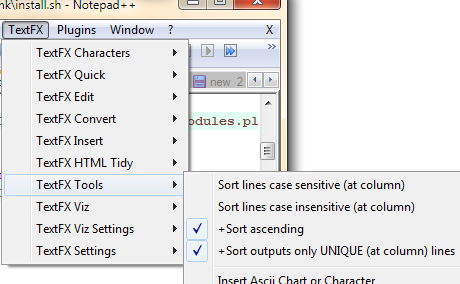
The check boxes and buttons required will now appear in the menu under: TextFX -> TextFX Tools.
Make sure "sort outputs only unique..." is checked. Next, select a block of text (Ctrl+A to select the entire document). Finally, click "sort lines case sensitive" or "sort lines case insensitive"
Solution 2
Since Notepad++ Version 6 you can use this regex in the search and replace dialogue:
^(.*?)$\s+?^(?=.*^\1$)
and replace with nothing. This leaves from all duplicate rows the last occurrence in the file.
No sorting is needed for that and the duplicate rows can be anywhere in the file!
You need to check the options "Regular expression" and ". matches newline":
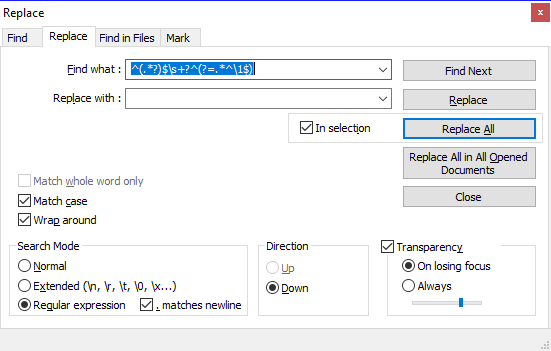
^matches the start of the line.(.*?)matches any characters 0 or more times, but as few as possible (It matches exactly on row, this is needed because of the ". matches newline" option). The matched row is stored, because of the brackets around and accessible using\1$matches the end of the line.\s+?^this part matches all whitespace characters (newlines!) till the start of the next row ==> This removes the newlines after the matched row, so that no empty row is there after the replacement.(?=.*^\1$)this is a positive lookahead assertion. This is the important part in this regex, a row is only matched (and removed), when there is exactly the same row following somewhere else in the file.
Solution 3
If the rows are immediately after each other then you can use a regex replace:
Search Pattern: ^(.*\r?\n)(\1)+
Replace with: \1
Solution 4
In version 7.8, you can accomplish this without any plugins - Edit -> Line Operations -> Remove Consecutive Duplicate Lines. You will have to sort the file to place duplicate lines in consecutive order before this works, but it does work like a charm.
Sorting options are available under Edit -> Line Operations -> Sort By ...
Solution 5
Notepad++
-> Replace window
Ensure that in Search mode you have selected the Regular expression radio button
Find what:
^(.*)(\r?\n\1)+$
Replace with:
$1
Before:
and we think there
and we think there
single line
Is it possible to
Is it possible to
After:
and we think there
single line
Is it possible to

Przemysław Michalski
Updated on July 13, 2022Comments
-
Przemysław Michalski 11 months
Is it possible to remove duplicated rows in Notepad++, leaving only a single occurrence of a line?
-
 arkon about 11 yearsMaybe others have had luck with this, but for me ^(.*\n)\1 results in "Cant find the text"
 -
 Grant Peters about 11 years@b1naryatr0phy make sure you have "Search Mode" set to "Regular expression", I also updated the pattern so that it can handle windows style line endings
 -
 Stefan Rogin almost 11 yearsnotepad++ has a light regex engine, it dosen't permit advanced functios, not even the "? or \r\n" as it only works on a single line and you use $ for the \r\n characters
 -
 Val over 10 yearsthis eliminates one by one. You must repeat it many times. I wonder why \n+ -> \n does not work (thought it reports many replacements)
 -
 Benny almost 10 yearsThis one is better indeed than the other regex. No need for multiple passes to eliminate all duplicates.
 -
 Aprillion almost 10 yearsoh, this one is brilliant, it even deletes empty rows, i'm macroing it this very moment :)
 -
 SarjanWebDev over 9 yearsGreat to learn. Precise explanation too! Thanks to both the raiser and reply-er!
 -
 SerG over 9 yearsIt just removes ALL lines in a file in some cases.
 -
 GeertVc over 8 yearsIncredibly powerful plugin, despite its "age". Hope they will NEVER remove that one from the standard NPP plugin offer. The guy who thought about all the features in this plug-in, was kind of a "visionary".
 -
 Cullub over 8 yearsIs there any way to remove the LAST occurrence? This matches all but the last one...
 -
 JV. over 8 yearsNote that this method does not give any kind of warning if the file is read-only. My file was sorted anyway, so it seemed that the tool had worked, until I spotted a duplicate. Quite frustrating until I tried @stema's search & replace method, which did warn me.
 -
 Iain Samuel McLean Elder over 8 yearsDoesn't work on Windows 7.
'cat' is not recognized as an internal or external command, operable program or batch file. -
 Travis Clark over 8 years@Iain Elder: cat is a standard Unix utility, which is why this answer specifies that it works on linux, FreeBSD, and MacOSX. The answer also suggests Cygwyn: This is a windows program that gives you a unix style shell, and with it, cat. Long story short (too late!): Win 7 needs Cygwin to do this.
 -
 Vasu about 8 yearsMore powerful than excel.
 -
 Elazar almost 8 yearsIn windows you have powershell:
cat yourfile | sort -Unique -
 Kuitsi over 7 yearsIn my case where this solution removed all lines, unchecking the
. matches newlinedid the trick. -
 ADTC over 7 yearsPerfect! I was using Notepad++ on a locked-down system with no internet access. No way to download plugins, so this was better for me.
 -
 RockPaperLz- Mask it or Casket about 7 yearsCreated a test file to try this, but the regular expression did not work reliably to get the job done.
 -
RockPaperLz- Mask it or Casket about 7 yearsCreated a test file to try this, but the regular expression did not work reliably to get the job done.
-
 Manohar Reddy Poreddy about 7 yearsFor all my data, it worked fine.I forgot what my solution was. Add more details where it failed so that other people might improve this regex.
 -
RockPaperLz- Mask it or Casket about 7 yearsI created a file so each line had a integer between 0-999 on it, in random order, sometimes with duplicates. It didn't remove most of the duplicates, and didn't remove any duplicates there were not sequential.
-
Manohar Reddy Poreddy about 7 yearsPlease do provide 2 examples for working and for not-working ones. It will help someone.
-
 prash about 7 yearsTextpad does it with one key - F9 hoping NP++ can also allow hotkey for this operation.
 -
 Kenigmatic about 7 years@Val, if you make the back-reference part of the match a group with 1-or-more matches required, the pattern will match N contiguous duplicate lines at a time:
^(.*\r?\n)(\1)+ -
 scott8035 about 7 yearsThese are good examples of "the gratuitous use of cat". Forget about the cat utility and just use file redirection thusly: sort < yourfile | uniq > yourfile_nodups
 -
 Thomas Weller almost 7 years@GeertVc: was that sarcasm, zynism or something? There's no TextFX plugin in my installation
 -
 Davidenko over 6 years@SerG In some cases it didn't work for me also, but when I removed "matches newline" it did :)
 -
 ACV over 6 yearsNO I don't want to sort anything
 -
 FORTRAN over 5 years@scott8035, I agree that cat is of no use for running that command, but I find it often helpful to start with cat when figuring out a long sequence of non-obvious commands, like cat file | sed ... | sed ... | sed ... and so on. So I'd say that there might be reasons for using cat. Of course cat can be removed at the end, but some are too lazy for that.
 -
 Sickboy over 5 yearsthe only one that worked for me (npp 7.3). thanks :-)
 -
 Geograph over 5 yearsWhat about Notepad++ x64 version? Plugin TextFX x64-version not exists
 -
 Patronaut about 5 yearsYou can install bash now on Windows 10, just search "Ubuntu" in Microsoft Store and follow the instructions in the Description.
 -
 th3pirat3 about 5 yearsi am not able to check the
Sort outputs onlyoption. What to do? -
 Rhyous about 5 yearsTextFx is not in the 64 bit version.
 -
 aldemarcalazans almost 5 yearsIn my case, ALL lines were removed, as happened with SerG. But, when I left unchecked "matches newline", it worked perfectly, as happened with Davidenko.
 -
 Mark Ch over 4 yearswhy
^(.*)\s+(\r?\n\1\s+)+$and not^(.*)\s*(\r?\n\1\s*)+$? -
Manohar Reddy Poreddy over 4 yearshey, I lost the context of this regex I wrote long back, but the difference you point is either 1 or more characters vs 0 or more characters, but if I wrote it + instead of * that must mean that I tried * then came to a + solution, so the answer must be correct to the question asked.
-
 Nick Kuznia over 4 yearsIf you adjust the capture group a little bit you can fix the side effect of deleting the file: ^([^\r\n]*)$\s+?^(?=.*^\1$)
 -
 Robert over 4 years@Geograph And there will be no 64 bit plugin of TextFx see this note. Therefore it would be good to know if there is an alternative plugin providing sort and duplicate removal.
 -
 user924 over 4 yearsonly found 1 line
 -
 Mariano Paniga over 4 yearsFor me it worked correctly only after sorting out lines with the native ordering function (Menu Edit → Line Operations → Sort Lines Lexicographically Ascending / Descending)
 -
 Peter Mortensen over 4 yearsPerhaps add some statement about the actual performance? It sounds like it must at least have quadratic performance (both memory and execution). What is the actual number of lines for which it takes more than 1 second to execute?
 -
Peter Mortensen over 4 yearsIsn't the file required to be sorted for this to work?
-
 P_W999 over 4 yearsIn notepad++ 7.6, the plug-in should be added to
C:\Users\<your_user>\AppData\Local\Notepad++\plugins\NppTextFX. Other than that this still works fine. -
 Hesham Eraqi almost 4 yearsWould you please provide an example that fails so I can improve my answer?
 -
 Shayan over 3 yearsThe only downside is that it sorts the lines.. I don't wanna change the order of my lines.
 -
Shayan over 3 yearsFor those who want to keep the first occurrence and delete the rest, reverse the lines first superuser.com/questions/331098/… and then use the regex above and then reverse again.
-
Peter Mortensen over 3 yearsTextFX has been phased out - from TextFX's Future: "... bid farewell to an aging workhorse that has served the community well." (though the link is broken now)
-
 john v kumpf over 3 yearsAnd for safety, you might want to remember to UNcheck "sort outputs only unique..." when you're done, so that a month from now, after you've forgotten all this, it does not happen unexpectedly, silently
 -
 Stewart over 3 years"You will need the TextFX plugin" ... then really it's TextFX doing it, rather than Notepad++ doing it.
 -
 wobblycogs almost 3 yearsIf you want to find unique characters in a file first use this: superuser.com/questions/1088622/… then sort the rows and then use this answer. A bit long winded but it works.
 -
 John Odom almost 3 years@GeertVc I don't see is in the Available tabs for Plugins Manager so I believe it was removed from the standard NPP plugin.
 -
GeertVc almost 3 years@JohnOdom: That is correct. And I anticipated on that by saving it locally on my system. But you still can find it here: sourceforge.net/projects/npp-plugins/files/TextFX. I would suggest: if you want to use it, take your copy and also save it locally. It's more than worth it. And I know, it isn't working on the 64 bit version of NPP but hey... I don't care... I'm very satisfied with the 32 bit version. As long as I have the capability to install TextFX, that's almost the only thing that matters to me...
-
GeertVc almost 3 years@Stewart: That's all about NPP. It's also not NPP who does the real text editing and manipulation. It's Scintilla which is the real workhorse and doing the heavy work in the background. NPP is merely, and I say this with the utmost respect for the guy who made NPP, a UI on top of lots of other "helper" stuff, like Scintilla, like the many plugins,... I'm using NPP now for already 15+ years or so and since CodeWright (R.I.P.) it's the best one I found out there for my purposes (beware: I'm not saying it's the best one out there...).
-
John Odom almost 3 years@GeertVc I did tried installing the latest version from there but I got an error saying that it is not supported by the latest version of Notepad++, so I went with stema's answer instead that works for me.
-
 Colin Pickard almost 3 yearsThanks for the update @GeertVc, I have updated the answer with the link you posted.
 -
GeertVc almost 3 years@JohnOdom: what latest version of NPP? 64 bit? Then the answer is: no it's not supported. I'm currently using NPP 7.8.9 - 32 bit (the latest version of NPP AFAICS, related to Hong Kong even...) and TextFX is working like a charm...
-
John Odom almost 3 years@GeertVc. It's 64-bit, so that would explain it.
-
 bucky over 2 yearsperfect for quick&dirty editing with "lists" copied into notepad++
 -
 Jack Rock over 2 yearsRemove duplicates leaving also the original row number position of other text, I like this solution
 -
 Noor Hossain over 2 yearsfor being more cautionary, I use Find Next, and remove the duplicate manually.
 -
 Toto over 2 yearsWhy is it difficult? Have you seen other answers? What's wrong with them?
 -
 Chandra Shekhar over 2 yearsSaved a lot of time. Thanks for the pictorial demo.
 -
 Mark Barnes about 2 yearsThere's also now an option for Edit -> Line Operations -> Remove Duplicate Lines which eliminates the need to sort.
 -
Mark Barnes about 2 yearsAlthough this is the accepted answer, it's not applicable to more recent versions of Notepad++. See this answer instead: stackoverflow.com/a/58549356/1681788
-
 user3304007 about 2 yearsWhats the difference between "Remove Duplicate Lines" and "Remove Consecutive Duplicate Lines"
 -
 dr.nixon about 2 yearsFirst option should remove all but one of each matching line in a document (so a, a, b, a, c would become a, b, c). Second option should only remove lines that are repeated immediately after a matching line (a, a, b, a, c would become a, b, a, c).
 -
 foundationer almost 2 yearsI like this because you're not forced to sort the contents of the file first. It also can be used on any text editor that supports Perl regex.
 -
 Dnyaneshwar Jadhav over 1 yearThis is perfect solution and saving my lots of time to go to Excel and perform Einstein based operations.
 -
 Urbley about 1 year64 bit version of TextFX github.com/HQJaTu/NPPTextFX/blob/VS2017-x64/bin/x64/…
 -
 TimothyHeyden about 1 yearThis works perfectly out of the box. Should be the accepted answer IMHO
 -
 prashant thakre about 1 yearExcellent answer and easiest approach. It worked perfectly for me.