Use child_process.execSync but keep output in console
Solution 1
You can pass the parent´s stdio to the child process if that´s what you want:
require('child_process').execSync(
    'rsync -avAXz --info=progress2 "/src" "/dest"',
    {stdio: 'inherit'}
);
Solution 2
You can simply use .toString().
var result = require('child_process').execSync('rsync -avAXz --info=progress2 "/src" "/dest"').toString();
console.log(result);
This has been tested on Node v8.5.0, I'm not sure about previous versions. According to @etov, it doesn't work on v6.3.1 - I'm not sure about in-between.
Edit: Looking back on this, I've realised that it doesn't actually answer the specific question because it doesn't show the output to you 'live' — only once the command has finished running.
However, I'm leaving this answer here because I know quite a few people come across this question just looking for how to print the result of the command after execution.
Solution 3
Unless you redirect stdout and stderr as the accepted answer suggests, this is not possible with execSync or spawnSync. Without redirecting stdout and stderr those commands only return stdout and stderr when the command is completed.
To do this without redirecting stdout and stderr, you are going to need to use spawn to do this but it's pretty straight forward:
var spawn = require('child_process').spawn;
//kick off process of listing files
var child = spawn('ls', ['-l', '/']);
//spit stdout to screen
child.stdout.on('data', function (data) {   process.stdout.write(data.toString());  });
//spit stderr to screen
child.stderr.on('data', function (data) {   process.stdout.write(data.toString());  });
child.on('close', function (code) {
    console.log("Finished with code " + code);
});
I used an ls command that recursively lists files so that you can test it quickly. Spawn takes as first argument the executable name you are trying to run and as it's second argument it takes an array of strings representing each parameter you want to pass to that executable.
However, if you are set on using execSync and can't redirect stdout or stderr for some reason, you can open up another terminal like xterm and pass it a command like so:
var execSync = require('child_process').execSync;
execSync("xterm -title RecursiveFileListing -e ls -latkR /");
This will allow you to see what your command is doing in the new terminal but still have the synchronous call.
Solution 4
Simply:
 try {
    const cmd = 'git rev-parse --is-inside-work-tree';
    execSync(cmd).toString();
 } catch (error) {
    console.log(`Status Code: ${error.status} with '${error.message}'`;
 }
Ref: https://stackoverflow.com/a/43077917/104085
// nodejs
var execSync = require('child_process').execSync;
// typescript
const { execSync } = require("child_process");
 try {
    const cmd = 'git rev-parse --is-inside-work-tree';
    execSync(cmd).toString();
 } catch (error) {
    error.status;  // 0 : successful exit, but here in exception it has to be greater than 0
    error.message; // Holds the message you typically want.
    error.stderr;  // Holds the stderr output. Use `.toString()`.
    error.stdout;  // Holds the stdout output. Use `.toString()`.
 }
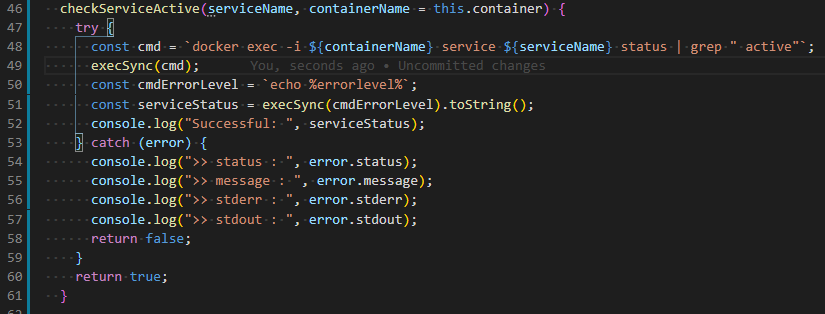
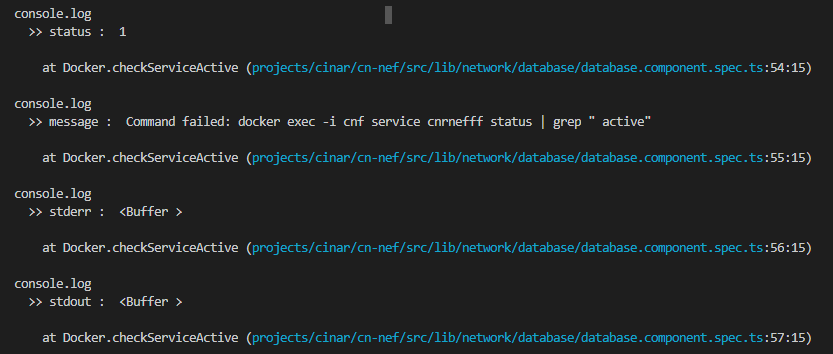
When command runs successful:

Related videos on Youtube
 06 : 37
 02 : 11
 06 : 29
 13 : 39
 08 : 38
 04 : 48

suamikim
Updated on March 12, 2022Comments
-
suamikim about 1 year
I'd like to use the
execSyncmethod which was added in NodeJS 0.12 but still have the output in the console window from which i ran the Node script.E.g. if I run a NodeJS script which has the following line I'd like to see the full output of the rsync command "live" inside the console:
require('child_process').execSync('rsync -avAXz --info=progress2 "/src" "/dest"');I understand that
execSyncreturns the ouput of the command and that I could print that to the console after execution but this way I don't have "live" output... -
 Richard over 7 yearsWhat does stdio[0,1,2] mean?
 -
 gregers over 7 yearsIt means that the child process will use the parent's stdin, stdout and stderr streams. So when the child process writes to either of them, it will actually be written directly to the parent´s stream.
 -
 chikamichi over 7 yearsThis is a very valuable answer, as the official documentation is not really explicit about the expected syntax.
 -
 AgDude over 7 yearsThe example using spawn may be correct, but the opening statement about not being about to use execSync is not accurate. See answer from @gregers
 -
 Kurt about 7 yearsInstead of
[0,1,2]I've used'inherit', which is equivalent to[process.stdin, process.stdout, process.stderr]or[0,1,2]as per docs -
 Álvaro González almost 6 yearsThis doesn't work on failure (status code != 0) because
.execSync()throws anErrorinstance. -
 etov over 5 yearsDoesn't work for me, i.e. output is only written after command finishes. Does this apply to a specific version? my node -v: v6.3.1
 -
etov over 5 yearsPlease consider updating the answer to note it's applicable only to certain node versions - this would make it more useful to others
-
 boileau over 5 years@Booligoosh How is that simpler ??
 -
boileau over 5 years@Booligoosh Instead of simply adding
{stdio:'inherit'}, you have to add .toString() and then call console.log manually with the result. In addition, it doesn't even fulfill the questions requirement of seeing the command output "live". I don't think it's "much simpler", in fact I don't think it's simpler at all. -
 karfau over 3 yearsDownvote since ti's in now way relating to the question regarding output during the command is executed.