Adobe reader slow opening pdf files
Solution 1
First step
My first step would be to look at the Acrobat rendering options, especially with an older video card.
- My first step would be to stop the hardware rendering which you can find under Edit/Preferences/3D and Multimedia:
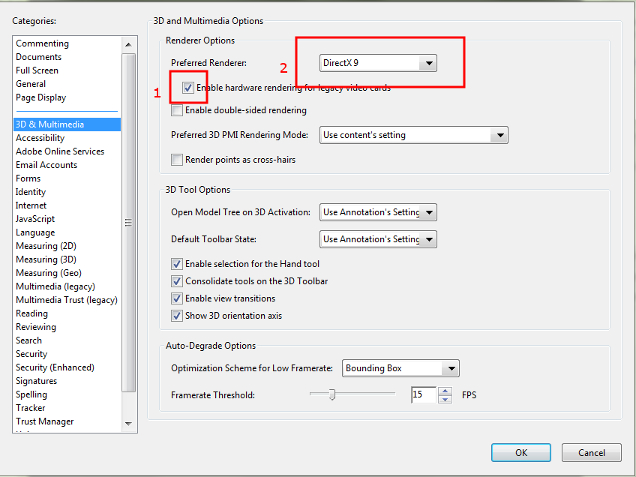
- You could also change the Preferred Renderer (from Directx to Software) but I'm unsure what other implications that might have - it might be overall slower, but eliminate the 'hangs'.
Next Steps - disabling unused add-ins
WP_ gave the info for this earlier so I'll just add it here from WikiHow
- Go to Acrobat -> Help/About Adobe Plugins
- From the list of Plug-ins:
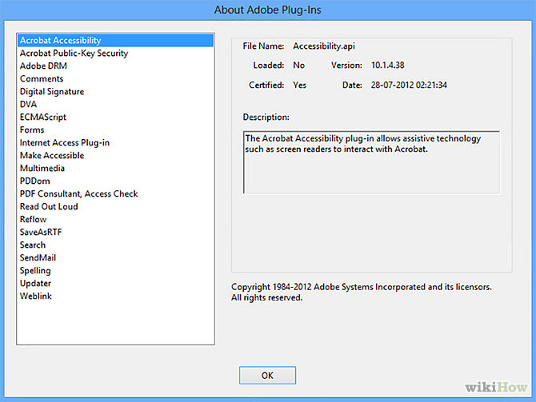
- Decide the plugins you need, note down the File names for those you don't:
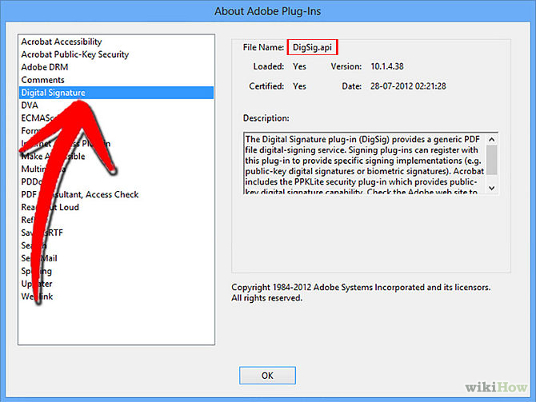
- Close Acrobat. Browse to
C:\Program Files\Adobe\Acrobat 6.0\Acrobat\Plug_insand locate the files of the extensions you don't require, move them to another folder (so you can restore if required). - Running Acrobat will now not load any add-ins you have moved, this should speed up performance and possibly remove add-ins which are causing any problem.
Extra tip: Double clicking to run Acrobat while holding down Shift opens the program without loading any add-ins for that particular instance.
Solution 2
It seems like you have tried everything except fiddling with the preferences and plug-ins i Adobe Reader.
It wouldn't hurt to go through this and report back: http://www.wikihow.com/Load-Adobe-PDF-Files-Faster
Related videos on Youtube

eldblz
Updated on September 18, 2022Comments
-
eldblz about 1 month
first of all i know, i'm sorry, this sound like the classic silly question "my computer is slow this morning" but if you keep reading you may find out it's not.
On 2 (identical) computer of my network (100+ computer) Adobe PDF Reader open pdf files very slow (about 20 to 30 seconds per file and when the file is opened, if the file has multiple pages, the scroll is "laggy")
What i've tried:
- Adobe Reader versions 9, 10, 11 all have the same problem
- other PCs in the same GPO with the same group policy etc don't have any problem
- Fox it reader runs fine but for policy reason i'd prefer to stick with adobe reader for all machines in the domain
- I tried to open PDF files from local hard drive, USB drive, Network drive all have the same problem
- No matter the size of the PDF (100kb to 10Mb) the loading time is still the same (20-30 seconds)
- No matter the type of pdf (image, text, mixed, optimized, not optimized) the loading time still the same (20-30 secs)
- If i open adobe reader without opening a file it opens in a seconds like it should do, but when i hit open a pdf file it just frooze for the, stated above, 20-30 secs
- Updated the graphic driver with no appreciable changes
- All other programs etc run smooth (autocad included).
- I've tried 2 different antivirus (and without antivirus): Symantec endpoint protection, kaspersky endpoint protection
What i think:
- Seems to be a rendering problem those 2 machines but i can't pinpoint where exactly is the problem. These are the only 2 workstation in the network to be affected.
Computer specs:
Operating System
    Microsoft Windows XP Professional 32-bit SP3
CPU
    Intel Xeon @ 2.40GHz    45 °C
    Bloomfield 45nm Technology
RAM
    4,00 GB Triple-Channel DDR3 @ 533MHz (7-7-7-20)
Motherboard
    Dell Inc. 0XPDFK (CPU)
Graphics
    Schermo predefinito ([email protected])
    256MB Quadro NVS 295 (nVidia)   47 °C
Hard Drives
    466GB Western Digital WDC WD5000AAKS-75V0A0 (RAID)  33 °C
Optical Drives
    HL-DT-ST DVD-ROM DH20N
Audio
    SoundMAX Integrated Digital High Definition Audio
Full system report available here: https://www.dropbox.com/s/3n9iq11cn4uqnt6/PCMAZ050.txt
What do you suggest?
Thank you in advance for your kind replys!
-
eldblz almost 10 yearsThank you for your answer! I'll try but a bad drive on both machines? To be precise i've many machines on the network but those are the only ones with those specs (however i've harddrives to spare).
-
 gronostaj almost 9 years@eldblz It's not as strange as it sounds. If two hard drives are manufactured at the same time, it's very likely that both will fail at the same time (manufacturing defects, poor materials etc.). That's also why you shouldn't buy identical drives for RAID arrays.
 -
 Doktoro Reichard almost 9 yearsCan you post the relevant parts of your link here, as to avoid link-rot? Link-only answers are generally not a good fit here at SU.
 -
eldblz almost 9 years@gronostaj thank you for your reply, just a follow up: while ago i changed the HD on one PC with a spare one (different vendor), reinstalled the OS etc, nothing changed same situation.
-
 TWiStErRob over 6 yearsAwesome, I disabled
Updater.apiand the hanging went away.