How to configure eclipse to autosave on run?
Solution 1
Update seven years later (Eclipse Neon 4.6)
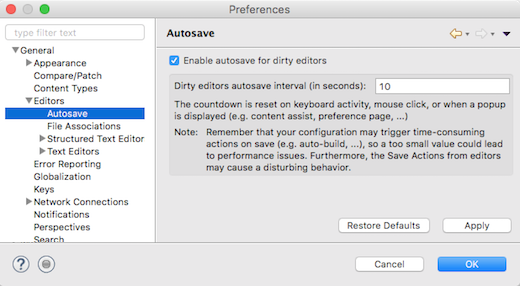
Eclipse now has an Automatic Save of dirty editors
The autosave option is disabled by default.
A new autosave preference page (Preferences > General > Editors > Autosave) is available and allows to enable/disable the autosave and change the interval of autosave.
The countdown is reset on keyboard activity, mouse click, or when a popup is displayed (e.g. content assist, preference page, ...).
Original answer (2009)
The OP IAdapter added in the comments:
I bet plugin like I describe exists.
... and you are right!
Eclipse plugin saveDirtyEditor should do just what you need.
Copy the SaveDirtyEditors_1.0.2.jar in your plugin directory.
You will get a new preference page under
General > Editors > Text Editors > Save Dirty Editors
, allowing you to save dirty files like 'myfile.java' under 'myfile.java.snapshot' every 30 seconds (can be less if you want).
Without additional plugin, though, Eclipse does not support natively that feature.
The closest could be:
Window > Preferences > type "build"
  > General > Workspace > [x] Save automatically before build
That way, each time you hit CTRL+B for actually building your sources, they would be saved.
But I realize this is not exactly what you are after.
Beware your option would not be very efficient with the "build automatically" option activated... (that would trigger too much builds)
Again, without achieving exactly what you are looking for, you also have:
Run/Debug > Launching > Save required dirty editors before launching
Run/Debug > Launching > [x] Build (if required) before launching
Note: the difference between IntelliJ IDEA and eclipse is the "compile on save" feature:
As mentioned in the IDEA FAQ:
Q:
Can I enable "compile on save" in IntelliJ IDEA?IntelliJ IDEA currently doesn't support this feature.
However there is an "Eclipse-mode" plug-in which provides similar functionality, so we suggest you to try this plug-in.
Note that by default IntelliJ IDEA saves the files for you, so you don't have to press the Ctrl+S shortcut frequently like you need to do in other IDEs.
However, with Eclipse, the "build on save" is activated by default, hence the absence of that particular feature.
Solution 2
http://code.google.com/p/eclatosa/
"Saves all open editors in eclipse when deactivating the eclipse window (like in IntelliJ)"
Solution 3
No need to install more plugin.
Window -> Preferences -> General -> Workspace and there you can check:
Save automatically before build + Build automatically
If that doesn't work try this:
Preferences -> Run/Debug -> Launching -> Save dirty editors before launching
Related videos on Youtube
 00 : 27
 04 : 20
 01 : 31
 01 : 51
 05 : 08
 00 : 29
 10 : 36

IAdapter
Updated on May 03, 2020Comments
-
IAdapter over 2 years
I'm looking for a configuration or plugin for eclipse that automatically saves files (so I don't have to use Ctrl+S). It could do it on lost focus or over some period of time. I think I saw something like that (I know IDEA has it), but I cant find it now.
-
IAdapter about 13 yearsI build from console since Maven plugin has sometimes problem with open projects. I bet plugin like I describe exists.
-
 Karl about 13 yearsThe plugin doesn't work as expected. It saves a copy of the file, rather than just saving the file :(
 -
 VonC about 13 years@Karl: strange, I did test it (on a eclipse4.5Mx at the time) and it was working as advertised... What is your configuration? (version of eclipse and of JDK)
 -
Denys Kniazhev-Support Ukraine over 9 years+1 - this plugin actually has an update site unlike saveDirtyEditor
-
 mtk over 7 years@VonC what is
01in01 added, the very first statement of your answer? -
VonC over 7 years@mtk it was the name of the OP at the time he/she wrote the comment (5+ years ago). I have edited the answer.